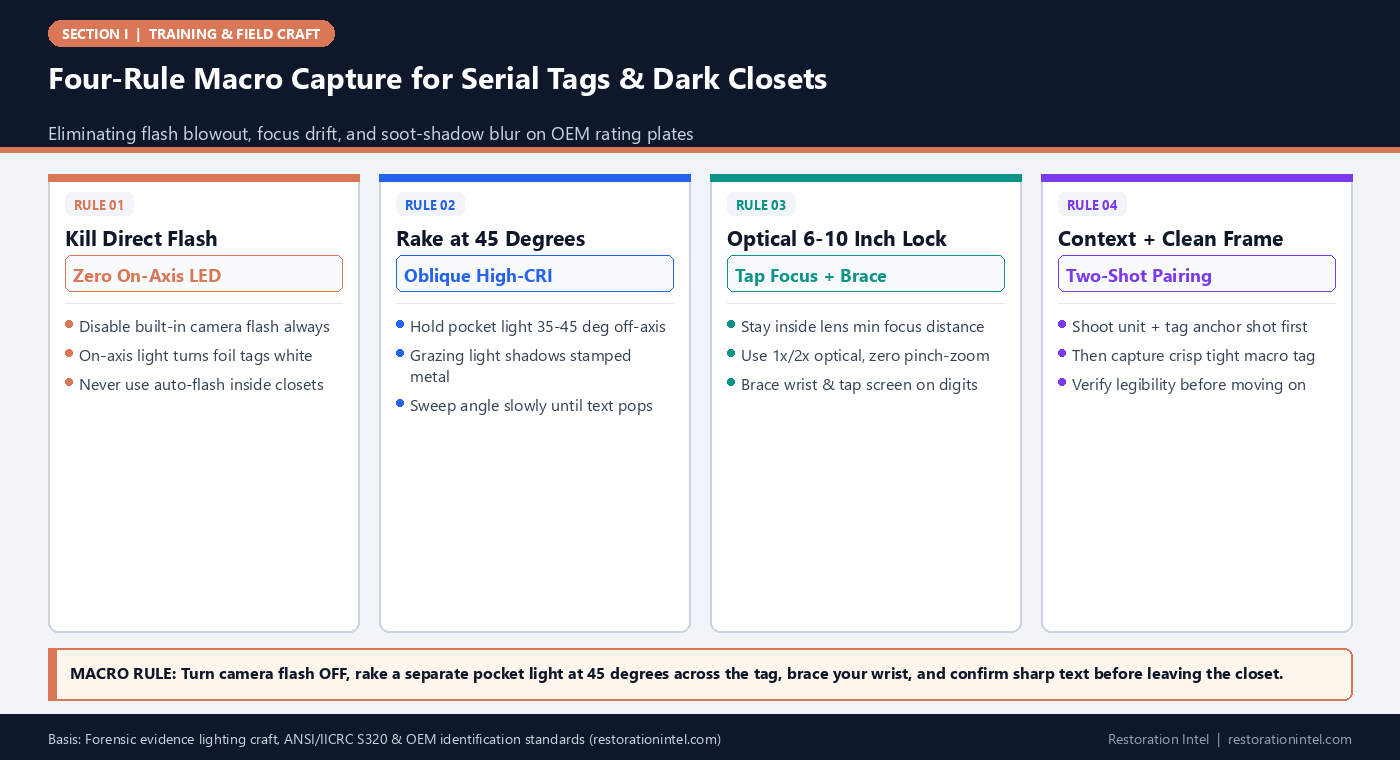
Direct Answer: Readable macro capture on faded serial plates and dark utility equipment requires turning off direct smartphone flash, illuminating the tag at a 35-to-45-degree oblique angle with a high-CRI pocket light, locking tap-to-focus on the engraved characters, and shooting from 6 to 10 inches using optical framing rather than digital zoom.
.md twin for estimator QA and carrier file documentation.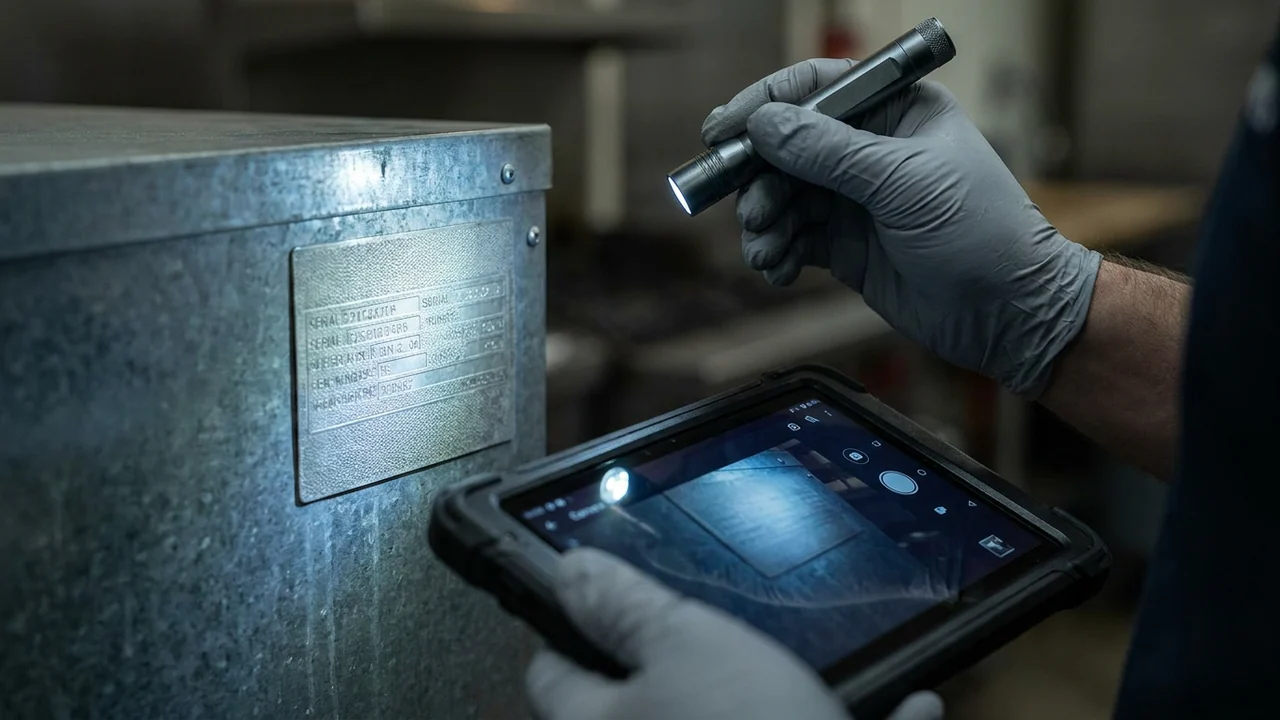
An unreadable model and serial number photo is the equivalent of no proof at all when an estimator tries to price a commercial espresso machine, stainless refrigerator, precision CNC controller, or vintage brass stereo receiver. Yet on almost every post-loss review, estimators open dozens of macro shots killed by the exact same errors: a blinding white flash reflection dead-center over the serial digits, soft focus locked on the wall behind the fridge, or smeared digital zoom taken from three feet away.
Utility closets, basement mechanical alcoves, and soot-coated laundry rooms compound the difficulty. Built-in smartphone LED flashes sit millimeters from the camera lens, firing flat perpendicular light straight back into foil stickers, anodized aluminum tags, and polished brass plaques—washing out stamped text into unreadable glare.
Mastering macro lighting and focus craft under ANSI/IICRC S320 and forensic photography principles takes one $25 pocket inspection light and five minutes of deliberate lens discipline. Done right, even tarnished 1980s brass plates and faded thermal paper barcodes resolve crisply on the first shutter tap.
Four-Rule Macro Capture for Serial Tags & Dark Closets
Serial Tag Lighting & Focus Playbook by Surface Type
Adjusting light angle, lens mode, and contrast setup across the five hardest identification surfaces encountered in field pack-outs.
| Tag / Surface Type | Why Standard Photos Fail | Optimal Light Angle & Tool | Focus & Distance Technique | Field Verification Standard |
|---|---|---|---|---|
| Foil / Glossy Metallic Appliance Sticker | Direct flash creates mirror hotspot right across model and serial strings | Flash OFF; high-CRI flashlight held 45 deg to side or diffused off white card | 6-8 inches away; 1x or 2x optical lens; tap focus on barcode edge | Every character and UL number readable at 100% zoom without hotspot |
| Stamped Brass / Engraved Metal Plaque | Low contrast between stamped letters and tarnished background | Low grazing raking light at 15-30 deg almost parallel to plaque surface | Brace phone on shelf or wrist; wait for sharp focus ring on etched grooves | Shadows inside stamped digits create crisp dark-on-brass contrast |
| Faded Thermal Paper / Inked Label | UV/heat fades thermal ink; bright light overexposes faint characters | Soft indirect bounce light off white index card or ceiling; lower exposure slider | Lock focus, then drag screen exposure sun-icon slightly down until faint ink darkens | Faint ink lines remain darker than paper substrate without washout |
| Deep Rear Utility / Behind-Washer Tag | Zero working space to look at screen straight-on; arm shake blurs low-light shutter | Clip magnetic work light to wall pipe angled across tag; never use phone in dark | Use selfie/rear inspection mirror check or brace back of phone against wall | Confirm full serial string in frame before sliding appliance back |
| Soot-Coated Equipment Nameplate | Soot film hides characters; wiping blindly erases pre-clean peril evidence | Capture untouched soot context shot first, then wipe tag edge ONLY if authorized | Two-shot sequence: wide dirty plate, then dry-sponge corner wipe + macro shot | Preserves soot deposition proof alongside clean OEM serial digits |
Why Direct Smartphone Flash Destroys Evidence and How Oblique Lighting Fixes It
On every smartphone and inspection tablet, the LED flash sits within half an inch of the main camera lens. That geometry forces light to strike flat surfaces perpendicularly and bounce straight back into the sensor—producing specular glare on brushed stainless steel, glossy refrigerator stickers, laminated furniture tags, and varnished wood maker marks. At the exact distance needed for a tight macro shot, direct flash routinely clips text to pure white.
Replacing built-in flash with a separate high-CRI (Color Rendering Index 90+) rechargeable penlight or headlamp held in the non-dominant hand solves glare instantly. Holding the light 35 to 45 degrees off to the side directs unwanted mirror reflection away from the lens while throwing subtle shadows into stamped letters, raised model embossing, and serial-plate rivets.
On deeply stamped brass plaques—common on antique pianos, heirloom clocks, commercial bakery mixers, and laboratory instruments—dropping the light even lower into a 15-to-20-degree raking beam skims light across the face while leaving engraved numerals dark and razor-sharp. Teach technicians to hold the camera steady and sweep only the flashlight angle until characters pop clearly on screen before tapping the shutter.
- Default flash OFF: Configure crew capture devices with flash disabled so dark closets never trigger accidental automatic glare bursts.
- White-card bounce trick: Carry a plain 4×6 white index card to bounce harsh flashlight beams into soft, shadowless fill on glossy stickers.
- High-CRI penlights: Cheap blue-tinted LEDs distort wood tones and soot staining; issue neutral 4000K-5000K high-CRI inspection lights.
Focus Distance, Optical Framing, and Exposure Control on Mobile Lenses
Modern multi-lens phones trick technicians into shoving the glass two inches away from a serial sticker. Unless the device automatically engages a dedicated macro lens—and even then, shallow depth-of-field blurs half the serial string when held at a slight angle—pushing past a lens’s minimum focus distance makes the entire frame soft while the background drywall snaps sharp.
Train technicians to hold the device 6 to 10 inches back, align the camera face strictly parallel to the tag plane so both ends of a long serial number share the same focal distance, and switch to optical 2x if available rather than pinching digital zoom. On devices without optical telephoto, a crisp 1x photo from 7 inches crops cleaner during estimating than an interpolated zoom shot.
Equally valuable is the screen exposure slider. Inside a dark utility closet, auto-exposure sees dark walls around a white water-heater sticker, boosts brightness to compensate, and blows out the white sticker completely. Tapping directly on the white tag to lock focus and dragging the exposure slider down a notch preserves every character cleanly.
- Parallel plane check: Tilt the phone square to the plate; angled shooting drops left or right digits out of macro focus.
- Wrist-brace stabilization: Dim closet shutter speeds run slower—rest two knuckles or your forearm against the appliance frame before shooting.
- Clean the lens first: Wipe fingerprints, drywall dust, and soot film off the phone camera glass with a microfiber cloth at morning check-in.
Handling Behind-Appliance Gaps, Soot Films, and Faded Thermal Labels
Utility closets and laundry alcoves rarely offer a clean straight-on angle. Water heaters, stacked washer-dryers, wine coolers, and server UPS racks often hide rating plates on side panels three inches from framing studs. Trying to cram a head and tablet into tight gaps leads to blind half-cut serial shots where the final four digits sit outside the frame.
When space prevents pulling an appliance out immediately—or before disconnecting hoses—use a magnetic inspection work light clamped overhead plus a simple articulating inspection mirror or clean wide-to-tight two-step capture once safely slid forward on protective glides. Never risk kinking copper gas lines or live electrical whips just to force an angle without lead clearance.
When soot coats a metal nameplate on a fire loss, preserve damage proof before cleaning the tag. Capture the soot-covered plate in situ first, then lightly clear only a small dry-sponge strip across the model/serial block (with crew-lead authorization) so both the ANSI/IICRC S700 soot evidence and the exact OEM string appear in consecutive frames, matching the discipline in Price Tag on a Lost Item.
- Two-shot anchor pair: Always shoot one medium frame showing the whole appliance plus tag location immediately before the tight macro frame.
- Faded ink rescue: Drop exposure slightly and cast angled light across sun-bleached or heat-faded thermal labels to maximize ink contrast.
- Never move live utilities blind: Check rigid gas lines, braided supply valves, and cord slack before sliding heavy units for rear plates.
Field Verification Before Leaving the Room: Zero Backtrack Standard
The worst time to discover a motion-blurred model number is three weeks later when the item sits wrapped inside Vault 14 behind six pallets of furniture. Unstacking two vaults to re-read one dehumidifier tag erases an entire afternoon of warehouse labor and delays claim settlement.
Enforce a non-negotiable two-second verification habit on every macro shot: tap the thumbnail preview, pinch-zoom into the serial digits right there in the closet, and read three characters aloud. If any digit blurs or reflects glare, shoot a second frame immediately while your inspection light is already in hand.
During Week 2 onboarding and morning debrief huddles, track macro re-shoot requests by technician. Two or three live comparisons showing how a 45-degree penlight turns glare into sharp text permanently fixes crew habits across every loss type.
- Read-three-digits check: Confirm you can read actual digits on the preview screen—not just see that a sticker is in frame—before stepping away.
- Capture both model and serial: Many appliances carry a short marketing badge on the front door and the full UL rating plate inside the jamb.
- Pair spoken backup: Read the model string aloud during narration whenever worn foil plates sit on the edge of legibility.
Practitioner Verification Checklist (I-04)
- Disable automatic smartphone/tablet LED flash across all capture devices before entering dim utility closets or basements.
- Illuminate metallic, foil, and brass rating plates at a 35-to-45-degree oblique angle (or 15-to-20-degree raking light for engraved brass) with a high-CRI penlight.
- Hold the camera square to the plate at 6 to 10 inches using 1x or 2x optical framing, tap-focus on text, and brace wrists against steady surfaces.
- Capture a two-shot sequence—medium appliance context first, tight serial macro second—and preserve soot coverage before clearing any small tag strip.
- Pinch-zoom and verify every digit is legible on the screen preview before sliding equipment back or leaving the room.
Standards, Authority References & Related Reading
Primary standards, insurance definitions, and sibling Restoration Intel guides referenced in this brief:
- ANSI/IICRC S320 Standard for Professional Contents Restoration
- ANSI/IICRC S700 Fire & Smoke Restoration Standard
- NIST Organization of Scientific Area Committees for Forensic Science
- Verisk XactContents Platform Overview
- Related Guide: The 30-Day Field Contents Technician Onboarding Curriculum: From Zero Experience to Audit-Ready Capture
- Related Guide: Room-Sweep Discipline: Teaching Technicians a Repeatable Clockwise & Top-to-Bottom Capture Pattern
- Related Guide: Audio Narration Training: Coaching Field Crews to Speak Specs Clearly Without Slowing Pack-Out Speed
- Related Guide: Pre-Loss Serial Plate and Invoice Vaulting: Organizing Digital Proof So Fire or Flood Doesn't Destroy It
- Related Guide: A Price Tag on a Lost Item Is Worth Nothing
.md twin for desk QA and team training.Frequently Asked Questions
Why do smartphone photos of silver refrigerator tags keep coming out blurry or washed out?
Two reasons: the built-in flash fires straight back into the reflective foil sticker creating white glare, and holding the phone closer than its lens minimum focus distance forces focus onto the background.
What pocket flashlight works best for reading serial plates?
A compact rechargeable inspection penlight with high CRI (90+) and neutral 4000K-5000K color output, ideally with a stepless dim or low mode so close-range tags do not overexpose.
Should technicians wipe soot off an appliance nameplate before photographing it?
Always capture the untouched soot-covered tag and surrounding surface first so fire-peril evidence is preserved. Only lightly dry-wipe the immediate model/serial window if crew-lead protocols permit, followed by a second clean macro frame.
When is a serial plate photo considered estimator-ready?
When an estimator can open the image, read the full manufacturer, model number, and serial string clearly without guessing between ‘8’ and ‘B’ or ‘0’ and ‘O,’ and link it to the medium item frame.