Direct Answer: Residential home-office pre-loss documentation separates employer-issued hardware from personally owned gear, maps multi-peripheral workstations and serial plates, and secures private client data so pack-outs never trigger custody or sublimit confusion.
.md twin for estimator QA and carrier file documentation.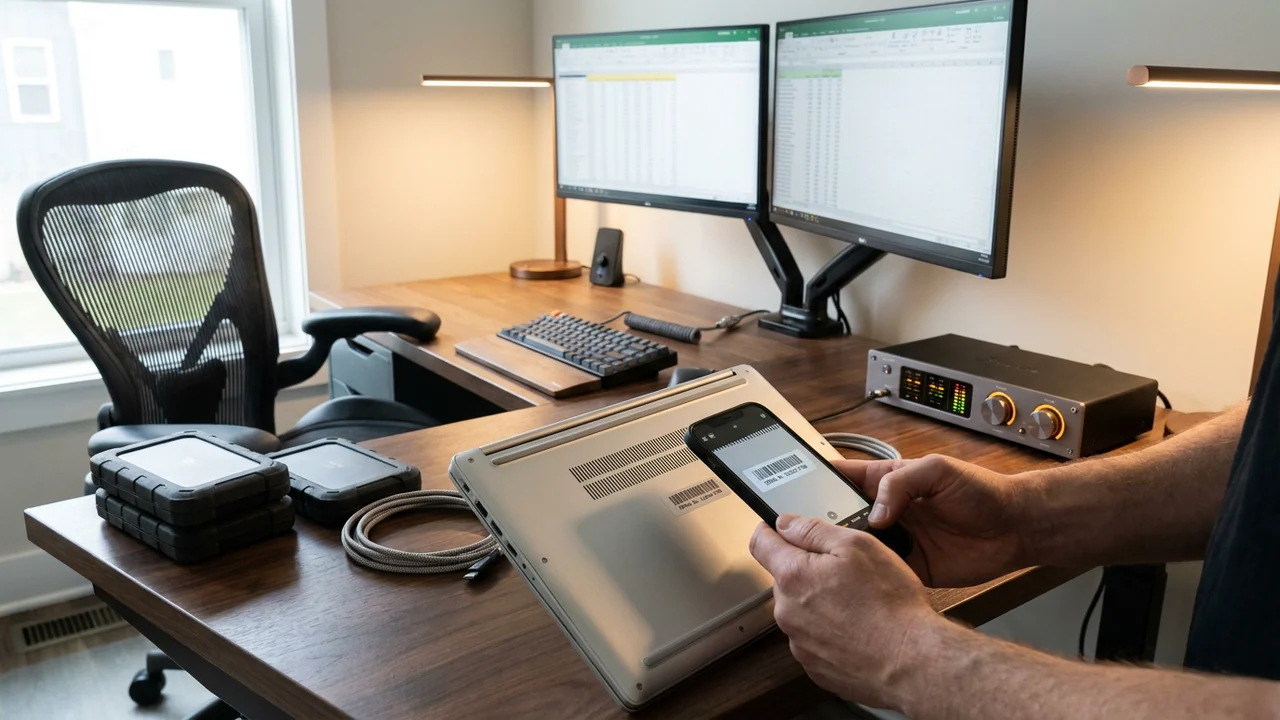
Remote and hybrid work has turned spare bedrooms, basements, and converted sunrooms into some of the highest-density electronic zones inside residential properties. A single ten-by-twelve home office frequently houses an employer-issued laptop and dock, two personally purchased ultrawide monitors, an ergonomic task chair, studio microphones, a battery UPS, network-attached storage (NAS), and client paper files.
When a ceiling pipe bursts or kitchen smoke travels down the hallway, poorly documented home offices create immediate chaos. Crews unplug cable nests without mapping what belongs to whom, employer IT departments demand emergency chain-of-custody tracking for corporate laptops, and policyholders discover too late that personal-vs-business equipment boundaries affect how items are sorted and priced under IRMI RCV and ACV frameworks.
Practical scope boundary: Restoration contractors and pre-loss documentarians capture physical ownership labels, hardware specs, and data-custody boundaries purely for field operations and inventory accuracy—they do not interpret homeowner policy business-property sublimits, employer bailment terms, or home-office tax rules. Homeowners and remote workers must confirm coverage limits and employer equipment responsibilities with their licensed insurance agent, carrier, or employer IT/legal team.
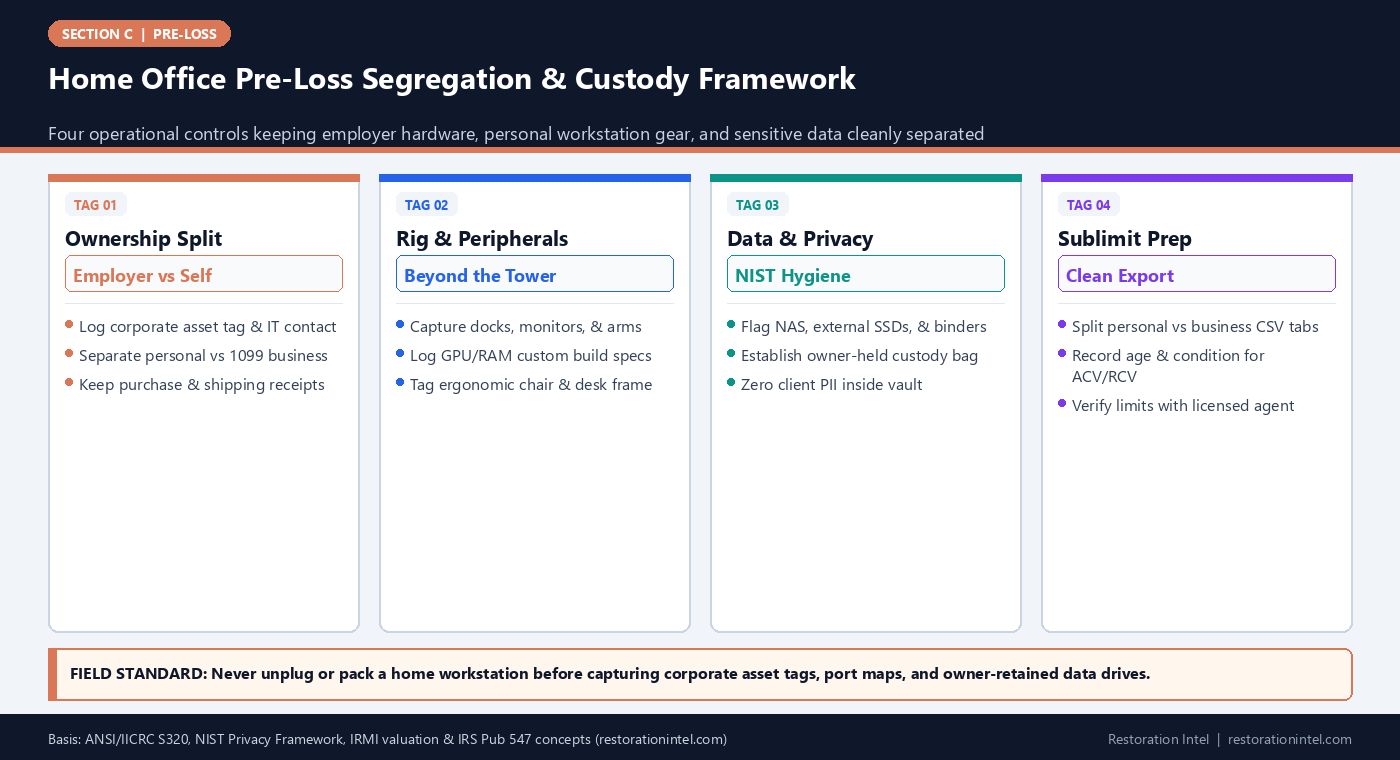
Home Office Pre-Loss Segregation & Custody Framework
Home Office Pre-Loss Documentation & Custody Matrix
Separating ownership, hardware specifications, and data-security handling across common residential remote-work setups.
| Workstation Asset Group | Ownership & Boundary Flag | Pre-Loss Proof & Specs to Capture | Data / Confidentiality Risk | Loss-Day Pack-Out & Triage Action |
|---|---|---|---|---|
| Employer-Issued Laptop & Dock | Corporate property; employer IT custody applies | Corporate asset sticker, OEM serial plate, IT helpdesk email | High: corporate VPN, trade secrets, regulated files | Hand directly to owner or ship to corporate IT per employer SOP |
| Personal Desktop, Monitors & Peripherals | Personal or self-employed workstation gear | Build BOM/invoices, monitor resolution/panel code, dock model | Medium: local drives & browser credentials | Pull SSDs/HDDs to owner-retained bag before vaulting chassis |
| Ergonomic Chair, Standing Desk & Lighting | Commercial-tier furniture inside home room | Manufacturer under-seat tag (e.g., cylinder/model), desk motor tag | None | Distinguish commercial-grade task seating from budget office chairs |
| Creator / Consulting AV & Acoustic Gear | Often dual-use or business-property flagged | Mic/interface serials, camera bodies, acoustic panel specs | Low (SD cards carry media) | Remove memory cards; pack lenses/mics in padded anti-static totes |
| NAS Arrays, Routers, & Battery UPS | Network backbone & critical backup storage | Chassis serial, drive bay count/TB capacity, UPS VA rating | Critical: centralized backups & family records | Isolate power immediately if wet; owner retains drives; check Li-Ion UPS |
| Client Files, Tax Records & Credentials | Confidential paper & external media | Folder count & locked cabinet location only (never scan pages) | Critical: third-party PII, HIPAA, or financial records | Owner hand-carries out on Day 1; never vault sensitive client binders |
Separating Employer-Issued Hardware From Personal Workstation Gear
Walk into almost any modern home office and two items sitting three inches apart on the same desk have completely different legal owners. The laptop and Thunderbolt dock may carry a company property sticker from an employer in Chicago, while the 38-inch curved monitor, mechanical keyboard, webcam, and standing desk frame were bought on the homeowner’s personal card. Without clear pre-loss ownership tags, emergency pack-out crews treat the entire desk as one homogeneous residential pile.
Mixing corporate-owned electronics into a restoration warehouse vault slows both claim processing and employee return-to-work timelines. Employers frequently require immediate return of damaged corporate machines to internal IT security teams for drive destruction or warranty replacement rather than third-party contents cleaning.
A pre-loss home-office dossier solves this cleanly with two simple inventory flags: `OWN_PERSONAL` (including self-employed gear flagged separately if used for a home business) and `OWN_EMPLOYER` (recording company name, corporate asset ID, and IT return contact). Keeping physical ownership clear helps policyholders and employers coordinate without contractors giving coverage advice.
- Asset-tag pairing: Photograph both the employer barcode sticker and the OEM manufacturer serial plate on company laptops and monitors.
- Employer return card: Store the company IT asset-recovery email inside the room dossier so a PM knows immediately who owns the hardware.
- Non-UPL clarity: Separate physical ownership and business-use notes cleanly so licensed insurance advisors can review sublimits accurately.
Capturing Multi-Peripheral Workstations, Custom Builds, and High-Tier Seating
Standard residential walkthroughs routinely underestimate home-office value by half because wide-angle room photos look like ‘a desk, a computer, and an office chair.’ In reality, a remote engineer’s, architect’s, or audio producer’s desk hides thousands of dollars in sub-components: dual motorized desk frames, $1,200 commercial task chairs, calibrated color-accurate monitors, external GPU/storage enclosures, studio monitors, and braided surge protection.
Custom-built PCs pose a particular trap in XactContents pricing. An unbranded matte-black tower photographed from six feet away looks identical whether it holds a $600 office motherboard or $4,500 in workstation graphics cards and liquid cooling. Without a vaulted parts invoice (bill of materials) and an interior glass-off chassis photo, estimators have zero proof to defend upper-tier specs.
Documenting the desk pre-loss takes ten minutes: capture one wide desk elevation, one under-desk cable/motor/chair-label sweep, and macro serial shots for monitors, docks, audio interfaces, and UPS units—consistent with A Price Tag on a Lost Item Is Worth Nothing.
- Chair underside rule: Flip ergonomic chairs or reach underneath with a phone to capture the Herman Miller/Steelcase spec label.
- Custom PC BOM upload: Vault the full component invoice (CPU, GPU, RAM, SSDs, PSU) alongside a clear side-panel interior photo.
- Cable & port map: Snap a quick rear-desk wiring photo pre-loss so reassembly or pack-out doesn’t scramble complex multi-host switches.
Protecting Sensitive Data, NAS Drives, and Confidential Paper Records
Home offices used by healthcare administrators, attorneys, financial advisors, educators, and executives often hold regulated client records, unencrypted external backup drives, and corporate security tokens. Under NIST Privacy Framework principles and ANSI/IICRC S320 chain-of-custody best practices, restoration pack-out crews should never casually box up active hard drives or confidential client binders for multi-month off-site warehouse storage when avoidable.
During pre-loss planning, homeowners should never scan sensitive tax returns, client contracts, or medical charts into the pre-loss contents photo vault. Instead, simply note the locked drawer or NAS chassis location and designate a pre-labeled ‘Owner-Retained Custody Bag’ rule for Day 1.
If water or soot threatens the office, crews photograph the external NAS chassis and drives in place for damage proof, allow the homeowner to pull encrypted drives or sensitive binders into personal custody (or route wet vital media to specialized forensic data recovery), and log the handoff on the custody sheet.
- Never photograph open screens or papers: Keep client names, spreadsheets, and confidential binders out of pre-loss workstation photos.
- Drive-pull custody line: Establish a standard Day-1 rule letting owners retain SSDs, NAS drives, and YubiKeys while damaged shells go to triage.
- Wet-drive zero-power alert: Never power on a damp NAS or external HDD to ‘check files’—isolate unpowered for cleanroom evaluation.
Business-Property Sublimits, Depreciation Proof, and Tax Baseline Alignment
Many standard homeowners policies place tight dollar limits on business property located on or off the residence premises, while separate commercial endorsements, riders, or business policies treat dedicated equipment differently. Because terms vary dramatically across states and carriers, restoration teams must never advise homeowners on what is or isn’t covered.
However, contractors and estimators can give homeowners cleanly organized data so their agent and adjuster have zero ambiguity. Grouping pre-loss office inventories into dedicated sub-tabs—Personal Household Electronics, Dedicated Home-Business Equipment, and Employer-Owned Hardware—paired with purchase dates and paid invoices supports clean valuation across IRMI ACV, RCV, and casualty documentation references such as IRS Publication 547.
Just as importantly, photographing the room pre-loss proves exact model ages and condition—ensuring a six-month-old OLED monitor isn’t depreciated like a seven-year-old office display.
- Three-tab export split: Separate Personal, Self-Employed Business, and Employer IT assets cleanly inside the pre-loss spreadsheet.
- Age & invoice anchor: Pair purchase dates with serial numbers so desk adjusters apply accurate depreciation schedules without guesswork.
- Annual agent check-in: Recommend sharing the dollar total of dedicated home-office gear with a licensed insurance agent before policy renewal.
Practitioner Verification Checklist (C-11)
- Tag every home-office workstation item physically into Employer-Owned, Personal Household, or Home-Business equipment categories (without interpreting policy coverage).
- Capture serial plates, under-seat ergonomic chair labels, monitor specs, and custom PC bill-of-materials invoices before a loss occurs.
- Keep confidential client files, tax papers, and open laptop screens out of pre-loss photos; designate NAS drives and sensitive binders for Day-1 owner custody.
- Photograph rear desk cable routing and UPS battery backup ratings so crews can isolate power safely during water or smoke emergencies.
- Review the completed home-office asset total with a licensed insurance agent and employer IT representative annually.
Standards, Authority References & Related Reading
Primary standards, insurance definitions, and sibling Restoration Intel guides referenced in this brief:
- ANSI/IICRC S320 Standard for Professional Contents Restoration
- NIST Privacy Framework
- IRMI Insurance Glossary: Replacement Cost Value (RCV)
- IRMI Insurance Glossary: Actual Cash Value (ACV)
- IRS Publication 547: Casualties, Disasters, and Thefts
- Verisk XactContents Platform Overview
- Related Guide: High-Value Personal Property Sublimits: Identifying Jewelry, Firearms, Silver, and Art Before a Loss
- Related Guide: Pre-Loss Serial Plate and Invoice Vaulting: Organizing Digital Proof So Fire or Flood Doesn't Destroy It
- Related Guide: Pre-Loss Privacy & Access Controls: Protecting Sensitive Financial, Medical, and Security Information Inside Baselines
- Related Guide: A Pack-Out Record Is Not a Priced Inventory
- Related Guide: A Price Tag on a Lost Item Is Worth Nothing
- Related Guide: From Pre-Loss File to Day-1 Claim Schedule: How Estimators Reconcile Surviving vs Damaged Items After a Loss
.md twin for desk QA and team training.Frequently Asked Questions
Should employer-owned laptops and docks be included in a residential pre-loss walkthrough?
Yes, they should be photographed and explicitly tagged as Employer-Owned with the corporate asset ID and IT return contact—so emergency crews never confuse company hardware with personal contents during a chaotic pack-out.
Can a restoration estimator tell a remote worker if their homeowner policy business sublimit covers their desk setup?
No. Restoration estimators capture physical ownership labels, hardware specifications, and replacement-cost inputs only. Policy sublimits, endorsements, and coverage determinations must be reviewed with a licensed insurance agent or carrier.
How should home-office hard drives and confidential client files be handled during a pack-out?
Never include confidential client pages in pre-loss photos, and establish a Day-1 custody sign-off allowing the owner to retain encrypted NAS drives, backup SSDs, and sensitive binders rather than sending third-party PII into general warehouse storage.
Why do custom-built desktop computers get under-valued after a fire or flood?
From the outside, an unbranded PC tower hides the value of high-end graphics cards, processors, and storage arrays. Vaulting the component bill-of-materials invoices alongside an interior chassis photo gives estimators undeniable proof for Like-Kind-and-Quality pricing.