Direct Answer: Server room capture requires top-down rack elevation and U-position mapping, rear port-to-patch-panel photo indexing prior to disconnect, chassis- and blade-level serial/MAC logging, exact drive-bay slot provenance, and clear flagging of ISP, MSP, and leased equipment ownership.
.md twin for estimator QA and carrier file documentation.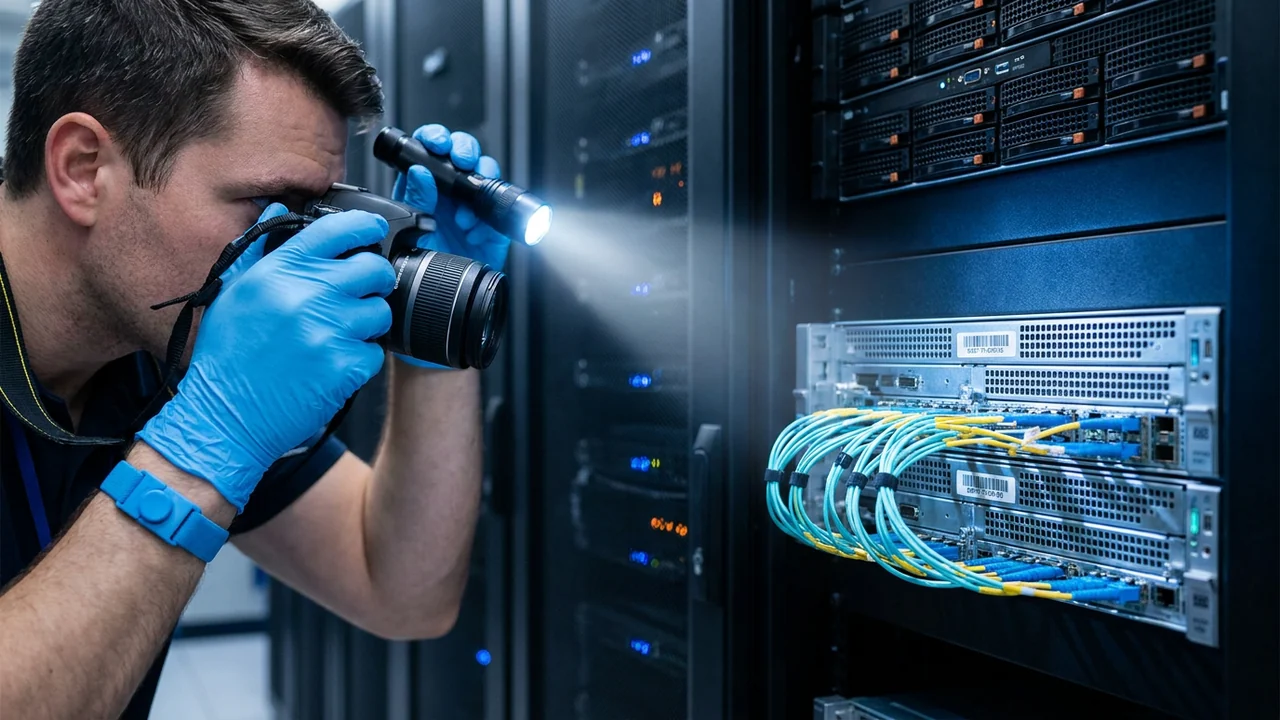
Once electrical Lockout/Tagout, suppression safety, and IT custody boundaries are locked in per Server Rooms & Commercial IT Infrastructure: Scope & Hazard Boundaries, contents documentation teams face one of the densest equipment concentrations in commercial restoration. A single 42U server cabinet can house 20 to 40 separate serialized devices—patch panels, core switches, firewalls, blade enclosures packed with 8 to 16 individual compute blades, SAN storage shelves filled with 24 hot-swap drives each, and dual rack-mount PDUs—every one carrying distinct models, capacities, support contracts, and replacement prices.
Logging that cabinet as “1x Server Rack w/ Contents” or guessing models from dark front bezels destroys valuation accuracy and triggers immediate desk-examiner rejections. Even worse, disconnecting fiber trunks or pulling hot-swap drives before indexing their exact slot order turns a recoverable enterprise architecture into an unrebuildable puzzle for the client’s IT team.
Precision capture under ANSI/IICRC S320 pairs physical topology photos with granular serial, configuration, and ownership metadata. Privacy, Security & Spoliation Disclaimer: Never photograph live terminal windows displaying credentials, IP schemas, or customer PII/PHI; never pull storage media without signed IT custody authorization; and preserve suspect power/UPS units intact if fire origin or subrogation investigation is active.
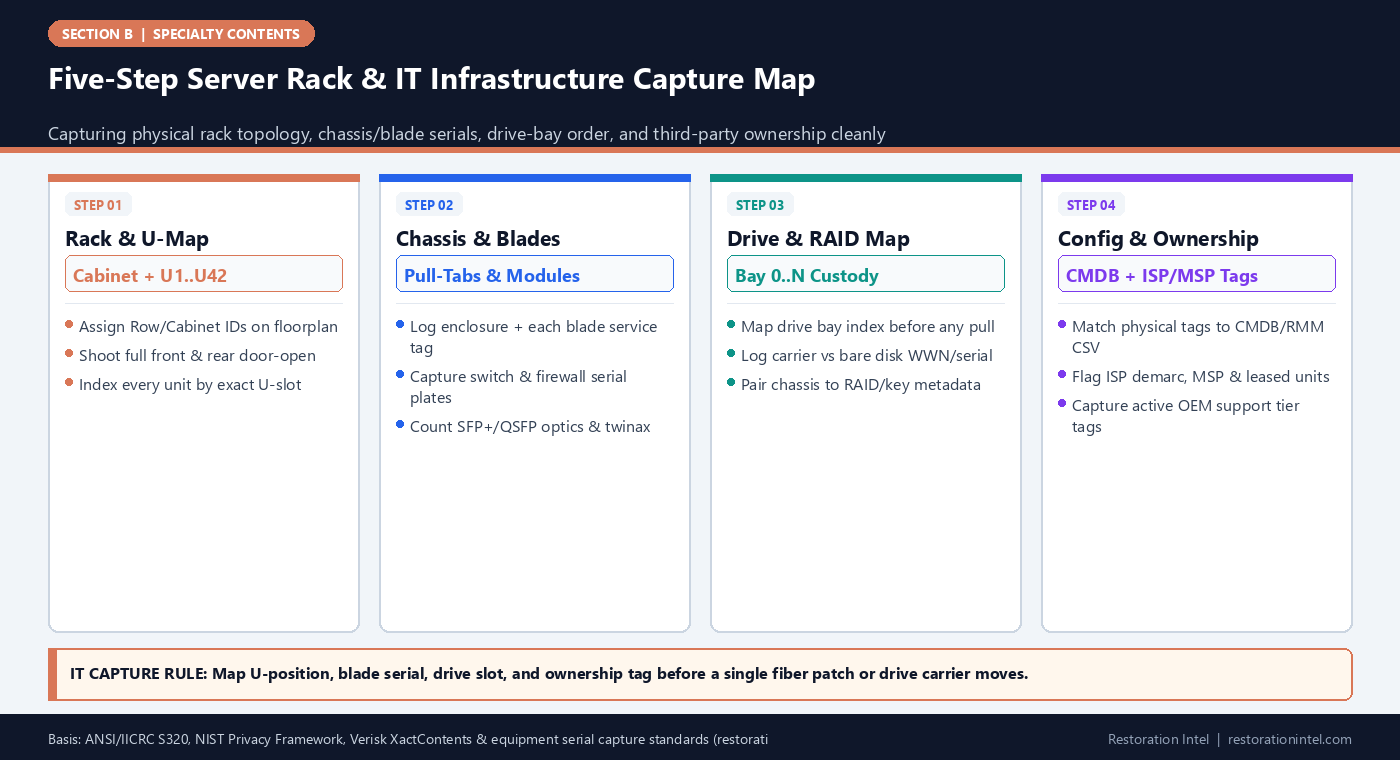
Five-Step Server Rack & IT Infrastructure Capture Map
Commercial IT & Server Room Serial, Spec & Ownership Capture Matrix
Required capture fields, hidden tag locations, and valuation-critical specifications across core server room hardware.
| IT Hardware Layer | Hidden Serial / Service Tag Location | Specs Needed for Accurate LKQ Pricing | Topology / Custody Proof | Common Field Logging Error |
|---|---|---|---|---|
| Rack Servers & Blade Enclosures | Front pull-out luggage tab, top chassis lid, or individual rear blade pull-handle | Exact OEM SKU, CPU count, RAM GB, NIC speed, PSU wattage, OEM support tier | Cabinet ID + U-slot range (e.g., R02-U14-U15) + rear cable map | Logging a 16-blade enclosure as 1 server and missing 16 blade tags |
| SAN / NAS Storage Arrays & Drives | Rear controller canister plates + individual drive carrier/label WWN & serial | SAS/NVMe/SATA type, RPM/endurance, TB capacity, controller cache/license | Bay-index grid (Bay 00–23) locked to array controller serial | Pulling drives out of bay order or pricing empty chassis without drive specs |
| Core Switches, Routers & Firewalls | Rear chassis sticker or pull-out side tab; SFP+ transceiver labels | Port count (24/48), PoE+ wattage, 10G/40G/100G optics, active security license | U-slot + port-map photo of uplink fiber & copper patch panels | Omitting expensive optical transceivers (SFP+/QSFP) & UTM subscriptions |
| Rack/Floor UPS & Smart PDUs | Rear metal nameplate or side battery-pack serial near Anderson/IEC plugs | kVA rating, input voltage (120/208/480V), external battery module count | A-feed vs B-feed designation + battery replacement date sticker | Counting extended battery packs (EBMs) as part of one bare UPS price |
| ISP Demarcation & MSP Gear | Side/bottom telecom asset sticker ('Property of ISP/MSP') + circuit ID tag | Carrier circuit ID, vendor model (do not price as owned BPP without verify) | In-place photo showing demarc fiber NID & vendor support sticker | Adding ISP-owned routers or MSP firewalls onto the insured's BPP total |
| Workstation & IDF Closet Swarms | Under/rear tower service tag; ceiling-mounted AP backplate; IDF wall-rack sticker | Exact CPU/GPU/RAM tier on engineering/CAD boxes; Wi-Fi 6E/7 AP model | Wall-jack / patch-panel port ID + room location log | Grouping $4,500 CAD workstations into generic '$800 office PC' averages |
Top-Down Rack Elevation and U-Position Mapping Before Any Disconnect
An enterprise server cabinet is a vertical address system. Every standard 19-inch rack is numbered in rack units (U1 at the bottom up to U42 or U48 at the top). Before any IT administrator or specialist technician touches a patch cable, the capture team should assign a unique cabinet identifier (such as MDF-ROW1-CAB03) on a floorplan diagram and photograph each rack top-to-bottom with front and rear doors fully open.
Record every installed asset by its exact U-range—for example, CAB03-U42: 48-Port Cat6A Patch Panel, CAB03-U39-U40: Core Switch A, CAB03-U20-U23: 4U SAN Array—plus zero-U vertical PDUs mounted along the rear cabinet rails. That U-elevation map gives estimators a 100 percent verifiable physical inventory count that reconciles directly against the visual overview photos.
Simultaneously, capture detailed rear port-mapping photographs showing where fiber jumpers, twinax DACs, and color-coded Ethernet trunks land, paired with power-cord routing to A-side and B-side PDUs as outlined in Electronics Disconnection & Cable Mapping. Those rear elevation frames save days of troubleshooting during eventual re-racking.
- Standardize cabinet IDs: Label every MDF, IDF, and server cabinet physically with high-contrast rack tags matching the floorplan.
- Index zero-U rails: Capture vertical zero-U metered PDUs, cable arms, and environmental temp/humidity sensors along rear rails.
- Optics before unseating: Shoot macro rear switch frames while SFP+/QSFP optical transceivers and fiber boots remain seated.
Finding Hidden Service Tags, Blade Serials, and Internal Spec Clues
Server room hardware hides its identity far better than household appliances. Front bezels cover drive bays and model numbers; dense rear cable bundles obscure chassis stickers; and sliding rails conceal top-lid labels. Technicians trained in Rating-Plate Locations and Macro Lighting for Dark Closets look first for the slim plastic pull-out luggage tag tucked between drive bays—carrying the Service Tag, Express Service Code, and embedded iDRAC/iLO MAC address.
Blade chassis and modular switches require extra vigilance. One 10U enclosure can hold 12 or 16 compute blades, redundant fabric interconnects, and management modules. Each blade carries its own service tag and unique CPU/RAM/storage build that varies by slot.
A bare chassis serial rarely tells an estimator the internal configuration needed for Like Kind and Quality (LKQ) pricing unless OEM lookup or a CMDB export confirms CPU, RAM, NVMe tier, and support level. Log the service tag macro cleanly for build-sheet lookup.
- Pull-tab macro discipline: Use a diffused LED light and macro focus on front pull-out service-tag tabs without jarring adjacent racks.
- Count every blade & PSU: Log blade enclosures and each populated blade bay, fabric interconnect, and redundant power supply separately.
- Note optics & licenses: Record transceiver counts (10G/25G/40G/100G) and firewall UTM license tiers—these often rival chassis cost.
Drive-Bay Slot Provenance and Storage Media Chain of Custody
Storage media carries the highest risk of irreversible error inside a server room. A 2U storage server or SAN shelf holds 12 to 24 hot-swap drives in a RAID pool or ZFS vdev. Pulling drives for data recovery or cleaning without slot-index labeling —or separating self-encrypting drives from chassis key metadata—can turn a recoverable array into permanent data loss.
Before any drive carrier leaves a bay (executed strictly by client IT or a specialist under SPC-DATA-REC custody rules), capture a straight-on bay-grid photo and affix solvent-resistant slot labels (CAB03-U20-BAY00 through BAY23).
Where drives move into anti-static custody cases, log both the bare drive WWN/serial and capacity/interface label alongside the parent chassis serial on a signed Chain-of-Custody Form.
- Map bays before movement: Photograph populated drive bays and label every sled with cabinet, U-slot, and bay number before extraction.
- Capture bare WWN/serials: Record the manufacturer serial and capacity rating printed on the drive top label—never rely solely on plastic sled stickers.
- Keep encryption context paired: Log the parent RAID controller, HBA, or external key-server reference alongside the drive custody manifest.
Reconciling Field Capture Against CMDB, RMM, and Vendor Asset Exports
Unlike a residential homeowner trying to remember what was inside a closet, commercial IT departments usually maintain configuration management databases (CMDB), remote monitoring and management (RMM) inventories, Dell/HPE/Cisco support portals, and fixed-asset depreciation ledgers. The fastest way to elevate a server room capture log from a rough field count to an audit-proof claim schedule is reconciling physical barcode/serial capture directly against those surviving digital exports.
Ask the client IT manager on Day 1 for read-only CSV exports of active hardware serial numbers, OEM support contract end dates, and deployed VM/storage specifications. Reconciling physical field captures against the CMDB export catches three things instantly: hidden equipment sitting in remote IDF telecom closets on other floors, decommissioned ‘cold-spare’ racks that were offline and absent from RMM scans, and exact internal RAM/CPU/SSD tiers inside identically looking 1U chassis.
Flag any discrepancy—such as a server listed in the CMDB that is missing from the rack, or an extra appliance present in the rack without an asset ledger entry—for immediate IT verification while physical site access remains open.
- Pull surviving IT exports: Request CMDB, RMM, and OEM warranty portal CSVs to pair internal CPU/RAM/drive specs with physical service tags.
- Sweep remote IDF closets: Verify every floor telecom closet and wall-mounted PoE switch rack—remote IDFs are routinely missed in main-room captures.
- Log cold spares explicitly: Document boxed spare drives, backup switches, and cold-standby firewalls stored on shelves inside the server room.
Logging ISP Demarcation, MSP, Colo, and Leased IT Ownership Boundaries
Inside almost every commercial MDF or server closet hangs hardware that the insured business does not own. Fiber optical network terminals (ONTs) and demarcation routers belong to telecom carriers (AT&T, Verizon, Lumen, Comcast); SD-WAN appliances, Wi-Fi controllers, or backup appliances may belong to a Managed Service Provider (MSP) under a Hardware-as-a-Service agreement; and enterprise storage arrays or multifunction print servers may be held under third-party equipment leases.
Photograph every telecom circuit ID tag, MSP property sticker, and leasing-company plate directly in place, and tag those rows explicitly for contract review per Leased, Financed, and Vendor-Consigned Equipment. Separating third-party hardware at capture prevents inflating the client’s BPP schedule with unowned assets while giving the carrier and MSP clear incident documentation.
Simultaneously protect sensitive data and subrogation integrity: keep terminal monitors, printed network diagrams showing passwords/IPs, and compliance binders out of claim photos under NIST Privacy Framework hygiene, and leave suspected origin UPS/PDU units photographed and untouched per NFPA 921.
- Tag ISP/MSP hardware in place: Photograph carrier demarc boxes, circuit IDs, and MSP property decals before any vendor swap occurs.
- Zero credential exposure: Never capture sticky notes with passwords, network topology secrets, or active diagnostic screens in claim photos.
- Preserve UPS/PDU origin evidence: If an electrical cabinet or battery pack is a suspected fire origin, document in situ and hold for forensic inspection.
Practitioner Verification Checklist (B-13)
- Assign unique room and cabinet IDs on a floorplan diagram and capture full front/rear rack elevation photos before disconnecting any cable.
- Index every server, blade enclosure, switch, SAN shelf, patch panel, and zero-U PDU by exact U-position range (U1 through U42/U48).
- Capture macro photos of pull-out service tags, blade serials, MAC labels, SFP+/QSFP optics, and extended UPS battery modules.
- Map drive-bay slot order (Bay 0..N) and log drive WWN/serial and capacity metadata under signed IT custody before extracting storage media.
- Reconcile physical field serial logs against surviving client CMDB/RMM asset exports and sweep all remote floor IDF telecom closets.
- Flag ISP demarcation boxes, MSP-owned hardware, and leased servers separately while excluding credentials/PII and preserving suspected origin units.
Standards, Authority References & Related Reading
Primary standards, insurance definitions, and sibling Restoration Intel guides referenced in this brief:
- ANSI/IICRC S320 Standard for Professional Contents Restoration
- NIST Privacy Framework
- NFPA 921 Guide for Fire and Explosion Investigations
- Verisk XactContents Platform Overview
- Symbility Claims Support Portal
- Restoration Industry Association (RIA)
- Related Guide: Server Rooms & Commercial IT Infrastructure: Scope & Hazard Boundaries
- Related Guide: Server Rooms & Commercial IT Infrastructure: Cleanability vs Total-Loss Triage
- Related Guide: Server Rooms & Commercial IT Infrastructure: Valuation, LKQ Sourcing & Policy Traps
- Related Guide: SPC-DATA-REC: The Value Is the Data, Not the Drive
- Related Guide: Rating-Plate, Serial Number, and Asset-Tag Capture Standards for Commercial Equipment Claims
- Related Guide: Leased, Financed, and Vendor-Consigned Equipment: Handling Third-Party Ownership on a Contents Inventory
- Related Guide: Field Guide: Rating-Plate Locations Cheat Sheet Across Appliances, HVAC, Shop Gear, and Electronics
- Related Guide: Field Guide: Chain-of-Custody Form Elements & Pack-Out Sign-Off Template
.md twin for desk QA and team training.Frequently Asked Questions
Why is mapping rack U-positions before disconnect so critical on IT claims?
U-position mapping proves exact cabinet density, matches rear cabling and dual-PDU power paths to specific servers, prevents undercounting stacked 1U/2U units, and gives IT teams a blueprint for rebuilding.
How do capture crews get exact CPU, RAM, and drive specs without booting damaged servers?
Capture the manufacturer’s pull-out Service Tag or chassis serial number macro cleanly, then reconcile that tag against OEM build-sheet lookups and the client IT team’s surviving CMDB or RMM inventory export.
Why must blade servers and drive bays be logged individually rather than by enclosure?
A single blade enclosure can house up to 16 independent compute blades with varied specs, and a SAN shelf holds dozens of individual drives whose bay order and serials govern both valuation and RAID data recovery.
What should be done with ISP fiber demarcation routers and MSP-owned firewalls during capture?
Photograph them in place with their circuit ID and vendor ownership tags clearly visible, then mark them as third-party property so they are routed under contract responsibility rather than mistakenly billed as client-owned BPP.
Can restoration technicians photograph server room whiteboards or sticky notes for network context?
No. Whiteboards, sticky notes, and live monitors frequently display IP schemas, administrative passwords, or customer data that violate privacy and cybersecurity boundaries. Photograph hardware tags and physical damage only.