Direct Answer: A standardized capture and documentation workflow gives desk examiners, independent adjusters, and public adjusters the exact photo hierarchy, rating-plate proof, quantity counting logic, and pre-cleaning condition evidence required to approve or verify scope without repeat site visits.
.md twin for estimator QA and carrier file documentation.
Field capture is where claim disputes are either prevented or manufactured. When an independent adjuster visits a site once on behalf of a desk examiner, or when a public adjuster’s inventory team documents a multi-room smoke loss, missing angles and blurry serial tags force every downstream reviewer to guess. At the desk level, guesswork almost always resolves into conservative default pricing, steep depreciation assumptions, or formal requests for additional information.
Executing documentation cleanly across the adjuster interface means moving beyond random smartphone snapshots toward a repeatable evidence hierarchy. Under ANSI/IICRC S320 principles and standard estimating workflows in Xactimate and XactContents, every high-impact line item needs proof of presence in an affected room, proof of identity and quality tier, and proof of pre-cleaning damage severity.
Crucially, the same capture standard serves all three seats. A desk examiner gets auditable verification without paying for a second field deployment, an IA finishes site reporting in fewer hours with fewer file kickbacks, and a PA builds a transparent evidentiary record that withstands carrier re-inspection.
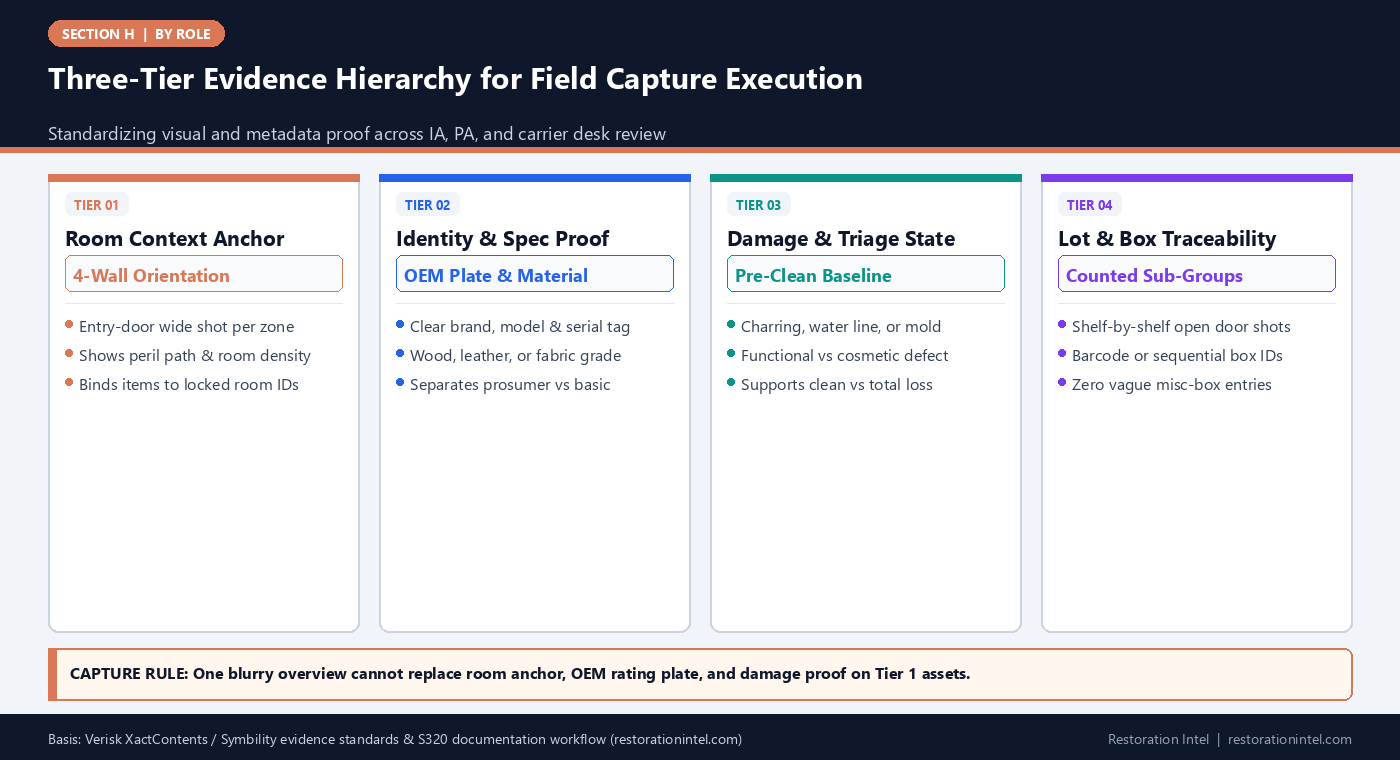
Three-Tier Evidence Hierarchy for Field Capture Execution
Capture Evidence Requirements by Asset Class & Adjuster Review Sensitivity
Minimum field documentation needed for desk examiner verification across common residential and commercial property tiers.
| Asset Category | Required Visual Sequence | Mandatory Metadata Fields | Common Field Capture Failure | Desk Examiner Audit Result |
|---|---|---|---|---|
| Major Appliances & HVAC Portable Units | Front elevation, damage detail, legible rating plate close-up | Brand, full model/serial suffix, approx age, power-test status | Glare over stainless plate or cropped sub-model code | Default builder-grade comp replaces commercial or prosumer spec |
| Consumer Electronics & Home Office | Screen/chassis overview, back port/model sticker, soot or water intrusion | Manufacturer, screen size/spec, year, cord/accessory count | Logging 'Samsung TV' without size, panel type, or model year | Adjuster issues RFI hold or prices entry-level model |
| Upholstered & Casegoods Furniture | Full piece in room, joinery/tag label, stain/soot/delamination detail | Dimensions, upholstery material, frame type, pre-loss wear | Closed cushion shots hiding underside delamination or pet wear | Dispute over cleanability vs non-salvageable replacement |
| Dense Closets, Pantries & Garages | Closed storage view, opened shelf-by-shelf sweep, spread-out high-value tools | Counted unit sub-lots, garment/tool tier, opened vs sealed status | Bundling entire closet as '1 lot mixed clothes' without count | Line disallowed or reduced to arbitrary lump-sum allowance |
| Fine Art, Rugs & Collectibles | Front face, maker/artist signature or weave backing, frame/edge damage | Artist/maker, dimensions, medium, appraisal or provenance note | Flash glare over glass hiding signature or damaged canvas backing | Triggers specialist appraiser hold and ACV/RCV suspension |
| Commercial Inventory & Fixtures | Aisle bay overview, SKU barcode/bin tag, moisture/smoke contact line | SKU, wholesale cost vs retail status, quantity by unit/case | Mixing damaged salable stock with operational office equipment | Breaks BPP valuation and delays business interruption alignment |
Enforcing the Room-to-Asset-to-Detail Photo Sequence
Most field documentation fails not from a lack of photographs, but from unindexed photographs. Uploading six hundred unsorted images to a claim portal forces a desk examiner to spend hours hunting for which bedroom contains a damaged dresser or whether a water-stained power strip belongs to the basement workshop or the kitchen.
A disciplined capture workflow executes in strict top-down sequence: first, an entry-door orientation photo with the room placard or digital label visible; second, wall-by-wall mid-range shots establishing spatial density before items are moved; and third, paired item shots linking the object in place to its close-up rating plate and damage indicator. Whether performed by an IA during a two-hour site inspection or a PA documentation technician over two days, that sequence preserves spatial truth.
When crews work in parallel across multiple floors, enforcing one sequential file naming or room-folder rule prevents duplicate uploads and split-shift omissions. Desk examiners who can click directly from a schedule line to its exact room-context and label photo approve scope faster because verification takes seconds instead of phone calls.
- Doorway anchor discipline: Shoot every room from the doorway threshold first so storage volume and layout are unmistakable.
- Lighting & glare control: Use angled diffused light or matte-angle framing on metallic appliance tags and glass-framed artwork to keep OCR and human reading crisp.
- Scale reference on damage: Include a standard ruler or marker beside veneer swelling, hail impacts, or soot lines so severity is visually objective.
- No unlinked bulk uploads: Prohibit dumping loose camera-roll photos into claim folders without room and line-reference metadata.
Documenting Pre-Cleaning Condition and Triage Rationale in Real Time
Desk examiners frequently question why a specific sofa, area rug, or cabinet piece was scheduled for replacement instead of cleaning, or why specialty ultrasonic cleaning was billed instead of standard wipe-down. Those questions are almost impossible to answer accurately three weeks after the item has been either scrubbed clean or hauled to a disposal container.
Under ANSI/IICRC S320 and Restoration Industry Association (RIA) best practices, pre-cleaning condition documentation must capture both the loss-related peril impact (soot saturation, sewage wicking height, microbial hyphae, thermal blistering) and pre-existing wear (scratches, sun fading, prior water rings). Recording pre-existing wear honestly in the field note protects credibility when a PA or contractor argues that remaining defects stem from the covered event.
For cleanable contents, capturing brief test-clean proof on delicate fabrics or porous wood shows the IA and desk examiner why a specialized process was selected. As outlined in Which Xactimate Line Items Adjusters Approve, line-level labor approvals follow verifiable field evidence of contamination type and material sensitivity.
- Honest wear baseline: Note pre-loss scuffs, missing hardware, or faded finishes at intake so depreciation discussions rest on facts.
- Test-patch documentation: Photograph small test-clean spots on borderline textiles or antiques before committing full restoration labor.
- Odor and porosity notes: Pair visual photos with concise sensory notes (e.g., protein smoke odor, Category 3 absorption) where cameras cannot capture smell.
Structured Counting Rules for Dense Closets, Pantries, and Storage Zones
Dense storage areas—walk-in closets, kitchen pantries, garage tool walls, and archive shelves—account for the widest count discrepancies between IA preliminary estimates and PA or contractor schedules. An IA working solo on a tight schedule may estimate ‘approximately 40 dress shirts’, while a detailed pack-out team counts 68 garments across two closet rods and three storage totes. Without shelf-by-shelf open-door photos, the desk examiner cannot tell whether the delta reflects missed items or inflated counting.
Standardized lot-counting rules solve this cleanly. Rather than writing vague lump-sum lines such as ‘1 box misc kitchenware’ or ‘1 lot garage hardware’, field capture breaks dense spaces into functional sub-lots paired with open-container photographs: folded knitwear versus structured coats, small hand tools versus corded power tools, sealed pantry cans versus opened dry goods.
Consistent sub-lot taxonomy also simplifies policy exclusion filtering. Opened perishable food, expired medications, or hazardous household chemicals can be isolated cleanly on one documented exclusion log without contaminating the count accuracy of durable cookware or sealed commercial stock.
- Open-drawer sweep rule: Photograph every closed drawer, cabinet, and opaque tote open before pulling contents so density is indisputable.
- Functional sub-lot sizing: Group low-value consumables into transparent counted batches (e.g., ’18 hardcover novels’, ’12 stainless mixing bowls’) rather than mystery boxes.
- Box-to-room custody map: Stamp every packed carton with room origin, box number, and summary manifest visible in the closing box photo.
Synchronizing Field Capture Metadata With Carrier Estimating Schemas
A field capture workflow only achieves full efficiency when the metadata fields recorded on site match the fields required by the desk estimator and carrier review platform. In XactContents and Symbility, schedules rely on structured columns: Room, Item Description, Category/Selector, Quantity, Age, Condition, RCV Source, and Disposition (Clean, Replace, or Non-Claim).
When field teams capture free-text paragraphs without structured age, condition, or disposition tags, estimators spend hours decoding notes—or worse, leave age blank so software defaults distort ACV calculations. Conversely, when IAs and PAs capture the same core schema fields at first walk, both carrier and policyholder representatives can compare schedules line by line without re-keying.
Cross-checking platform alignment early also catches missing regional detail such as unit-of-measure distinctions (each versus pair versus box) and specialty sublimit categories before the crew demobilizes from the loss site.
- Mandatory disposition tag: Mark every captured line on site as Restore/Clean, Total Loss/Replace, Pre-Existing/Excluded, or Hold for Inspection.
- Age & condition prompt: Collect realistic age bands from the insured during capture rather than inventing placeholder ages at the estimating desk.
- Pair vs unit clarity: Explicitly specify ‘pair’ or ‘set’ on footwear, speakers, curtains, and dining chairs so quantity multipliers never double-count.
Practitioner Verification Checklist (H-26)
- Capture a doorway wide-angle orientation shot with locked Room ID before logging individual assets or opening storage containers.
- Obtain readable brand, model, and serial rating-plate photos on all appliances, electronics, and prosumer tools.
- Document pre-cleaning peril severity alongside pre-existing wear notes to support restore-versus-replace decisions.
- Photograph every dense closet, drawer, and packed box open with counted functional sub-lots instead of vague miscellaneous lots.
- Record structured disposition, realistic age, condition, and unit-of-measure metadata aligned to XactContents or Symbility columns.
Standards, Authority References & Related Reading
Primary standards, insurance definitions, and sibling Restoration Intel guides referenced in this brief:
- ANSI/IICRC S320 Standard for Professional Contents Restoration
- Restoration Industry Association (RIA)
- Verisk Xactimate Estimating Platform
- Symbility Claims Support Portal
- Related Guide: Adjuster Interface (Desk Examiner, IA & Public Adjuster): Initial Scope & Loss-Walkthrough Intake
- Related Guide: Adjuster Interface (Desk Examiner, IA & Public Adjuster): Team Handoff Between Field Capture and Desk Estimating
- Related Guide: The Adjuster Desk: One Standard, Two Chairs
- Related Guide: Which Xactimate Line Items Do Adjusters Actually Approve?
- Related Guide: Two Standards, One Truck: Documentation When the Brand and the Scorecard Disagree
.md twin for desk QA and team training.Frequently Asked Questions
How many photos does a desk examiner actually need per damaged item?
Low-value bulk items can share a clear shelf or open-box context photo showing count and condition, while high-value appliances, electronics, furniture, and non-salvageable items need an in-room context shot, a damage close-up, and a readable brand/model label.
What should field crews do when a rating plate is melted or buried behind heavy debris?
Photograph the obscured or heat-damaged plate in place, capture overall dimensions, unique hardware, and manufacturer markings elsewhere on the unit, and note why the serial tag was unreadable so the desk examiner understands the evidentiary gap.
Why do desk examiners reject '1 lot miscellaneous contents' entries?
Unitemized bulk lots cannot be verified for quantity, quality tier, age-based depreciation, or policy sublimits. Counted functional sub-lots paired with open-drawer or shelf photos resolve this audit block.
Does pre-existing wear automatically disqualify an item from claim coverage?
No. Pre-existing wear affects depreciation and ACV calculation or helps distinguish prior damage from new peril damage, so recording it accurately improves file credibility rather than hurting valid claims.