Direct Answer: Before transmitting any claim packet, the Contents Estimator runs a structured pre-submission QA audit that reconciles row-level arithmetic to cover-sheet totals, strips building components and multi-angle duplicates, verifies photo-to-line traceability, and confirms clean XactContents or Symbility export integrity.
.md twin for estimator QA and carrier file documentation.
Even an accurately captured, fairly priced contents inventory can be kicked back by a carrier desk examiner over mechanical defects: a summary page that fails to sum to the underlying rows, a kitchen cabinet left inside personal property totals, three ungrounded round-dollar estimates, or broken photo links in an ESX export. Once an adjuster spots two careless errors on page one, every subsequent page receives line-by-line skepticism.
The Quality Assurance Review and Pre-Submission Audit is the Contents Estimator and Claim Packet Specialist’s final firewall. Building directly on the four pre-trust verification checks established in A Pack-Out Record Is Not a Priced Inventory, this audit tests the packet the exact way an opposing reviewer or carrier QA auditor will test it—checking arithmetic parity, basis completeness, pile separation, and end-to-end custody traceability.
Running a repeatable pre-submission checklist across XactContents, Symbility, and companion XLSX packets turns submission quality from an individual habit into a measurable division standard aligned with ANSI/IICRC S320 professionalism.
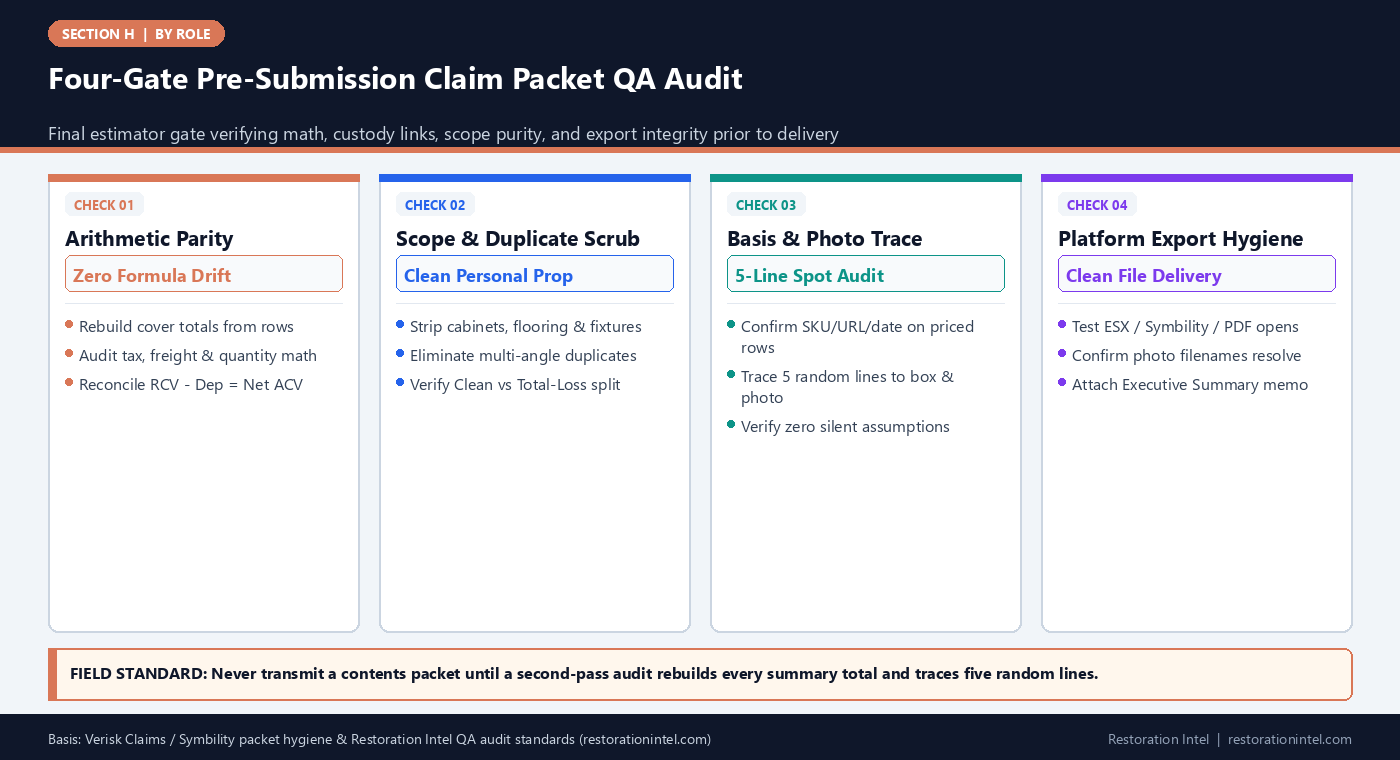
Four-Gate Pre-Submission Claim Packet QA Audit
Pre-Submission QA Audit Matrix & Kickback Prevention Controls
Systematic checks executed by the Contents Estimator & Claim Packet Specialist before releasing any file to a PM or adjuster.
| Audit Domain | Pass/Fail Test Procedure | Common Defect Caught | Corrective Fix Before Send | Adjuster Kickback Prevented |
|---|---|---|---|---|
| 1. Mathematical Reconciliation | Sum Qty x Unit RCV + Tax + Freight independently against cover-page totals | Hard-coded summary totals, hidden filter rows, or broken spreadsheet formulas | Replace static numbers with live verified formulas; re-export PDF/XLSX | Immediate rejection for arithmetic discrepancy |
| 2. Basis Completeness | Filter priced lines for blank source, SKU, URL, or date fields | Round-dollar placeholder guesses ($500, $1,000) left from draft triage | Attach verified LKQ comp or move line to Pending Valuation queue | Unsupported-price deletions across high-dollar lines |
| 3. Building-Component Scrub | Scan rooms for cabinetry, vanities, built-in ovens, blinds, carpet, or trim | Dwelling fixtures captured in room photos mistakenly priced as contents | Remove building items or transfer to structure estimator with cross-note | Coverage rejection & double-scope accusations |
| 4. Duplicate & Count Check | Sort by Room + Category + Unit RCV to spot identical furniture/electronics | Same sofa, TV, or miter saw logged from both overview and detail shots | Verify unique physical units against room panorama and pack-out count | Credibility audit triggered by inflated unit quantities |
| 5. Custody & Disposition Split | Cross-check Item IDs across Cleaning Scope, Total Loss, and Box Manifest | Items billed for cleaning also appearing on condemned replacement list | Enforce mutually exclusive disposition tags; scrub overlapping IDs | Double-billing disallowance & payment hold |
| 6. Export & Attachment Check | Open final PDF, XLSX, ESX, and photo index on a clean viewer before sending | Corrupted photo hyperlinks, truncated descriptions, or missing legend tabs | Re-package relative paths/embedded PDFs and verify readable filename order | Administrative stall before adjuster even opens pricing |
Mathematical Reconciliation and Formula Integrity
The fastest way to lose authority at an adjuster’s desk is sending a cover letter claiming $118,450 in Replacement Cost Value when the underlying line items sum to $114,200. Hidden Excel filters, deleted rows whose subtotal stayed hard-coded, mixed tax formulas, and manual rounding errors happen routinely when multiple team members touch a working schedule.
During the pre-submission audit, the Contents Estimator clears all active filters, checks every formula column from row one to the grand total, and verifies three exact identities: Quantity times Unit RCV equals Extended RCV, Extended RCV minus Depreciation equals ACV, and the sum of room or category sub-schedules equals the packet summary page to the cent.
If the schedule travels in native Verisk Claims ESX or Symbility formats alongside a client-friendly PDF summary, the estimator confirms exact dollar parity across every exported artifact so no stakeholder sees two conflicting totals.
- Zero hard-coded subtotals: Audit every summary cell to ensure dynamic linkage to underlying line tables.
- Hidden-row sweep: Unfilter and unhide all tabs before exporting final PDFs or calculating packet totals.
- Cross-format parity check: Confirm PDF cover sheets, XLSX tabs, and native ESX exports display identical RCV, Depreciation, and ACV figures.
Scrubbing Building Components, Duplicates, and Unresolved Silences
Field crews photograph everything inside a damaged room, which inevitably includes custom kitchen islands, built-in bookcases, wall-mounted HVAC thermostats, window blinds, and engineered hardwood flooring. If those fixtures slip into the personal property inventory, a carrier reviewer will rightly reject them as building items—and wonder what else in the file was padded carelessly.
The pre-submission scrub sorts the entire inventory by category and room to catch three structural errors: building components masquerading as personal property, multi-angle photo duplicates on large furniture or power equipment, and silent assumptions where an unresolved item was given a convenient placeholder price instead of a Pending flag.
As reinforced in Which Xactimate Line Items Do Adjusters Actually Approve?, transparently listing five items as Pending Owner Receipt or Pending Diagnostic builds far more trust than guessing five tidy prices.
- Dwelling-fixture filter: Cross-check kitchens, baths, and garages against the structure scope to remove permanently affixed property.
- Same-room sort audit: Sort each room alphabetically by object type and descending by RCV to catch split duplicates instantly.
- Placeholder purge: Scan for suspicious round numbers ($100, $250, $500, $1,000) and verify each has a genuine comp or moves to Pending.
Running the Five-Line Random Traceability Spot-Audit
Before hitting send on a 500-line inventory, reading every single line again produces fatigue blindness. A sharper technique is the five-line random traceability test: select five lines across different value tiers—one high-dollar appliance, one mid-tier furniture piece, one dense storage lot, one non-salvageable item, and one pending exception—and audit each completely from scratch.
For each sampled row, the estimator verifies four links: Can a third party open the cited photo and confirm the exact item and condition? Does the line trace back to a specific room and pack-out Box/Vault ID (or disposal manifest)? Does the retail URL or catalog code still resolve to a matching LKQ spec? And is the item excluded from duplicate billing on any restoration labor invoice?
If even one of the five sampled lines breaks—such as a broken photo ID or a mismatched box number—the estimator pauses submission and expands the audit across that room or crew batch before release.
- Stratified 5-line pull: Always include at least one Tier-1 asset (>$500), one dense lot, and one condemned line in the final spot-check.
- Cold-reader test: Ask whether an adjuster who never visited the house could verify each sampled line in under 60 seconds.
- Stop-and-expand rule: Any broken custody link or ungrounded price in the 5-line sample triggers a full review of that section.
Packaging the Transmittal Memo and Carrier-Ready File Bundle
How a claim packet is packaged determines how smoothly it enters the adjuster’s workflow. Dumping twelve unindexed ZIP folders and an unlabeled spreadsheet into an email forces the desk examiner to build their own table of contents.
The Contents Estimator closes the QA audit by assembling a clean transmittal bundle: a one-page Executive Summary Memo stating deliverable scope, room count, total line count, separated subtotals (Clean/Return, Total-Loss RCV/ACV, and Pending/Exceptions), and platform export notes; the locked valuation schedule in both native platform format and clean PDF; the cross-referenced photo index; and the companion pack-out custody/disposal receipts.
Testing every attachment on a separate viewer—verifying that Xactimate or Symbility files open cleanly and photo links resolve—ensures the packet clears administrative intake on the first pass.
- Executive Summary cover sheet: State scope boundaries, tax rate, subtotal splits, and open Pending items in one scannable page.
- Consistent file naming: Prefix every deliverable with Claim Number, Loss Name, Date, and Version (e.g.,
v1_Submission). - Frozen audit archive: Save a read-only copy of the exact submitted bundle in the job archive before transmitting.
Practitioner Verification Checklist (H-22)
- Clear all filters and verify live formula parity across Extended RCV, Depreciation, Net ACV, tax, and cover-sheet subtotals to the exact cent.
- Scrub personal property tabs to remove permanently affixed building components and eliminate multi-angle duplicate entries.
- Confirm zero blank price-basis cells on priced lines and move any unsupported or pending items into an explicit Pending/Unresolved tab.
- Execute a 5-line random cold-reader spot audit tracing description, photo proof, LKQ comp, and Box/Vault or disposal ID end-to-end.
- Bundle an Executive Summary cover memo, native platform export, clean PDF/XLSX schedule, and indexed photo/custody logs into a verified archive.
Standards, Authority References & Related Reading
Primary standards, insurance definitions, and sibling Restoration Intel guides referenced in this brief:
- Verisk XactContents Platform Overview
- Symbility Claims Support Portal
- ANSI/IICRC S320 Standard for Professional Contents Restoration
- Verisk Property Claims Solutions
- Related Guide: A Pack-Out Record Is Not a Priced Inventory
- Related Guide: Contents Estimator & Claim Packet Specialist: Pricing, LKQ Sourcing & Valuation Defensibility
- Related Guide: Contents Estimator & Claim Packet Specialist: Handling Non-Salvageable Lists & High-Dollar Exceptions
- Related Guide: Which Xactimate Line Items Do Adjusters Actually Approve?
- Related Guide: Xactimate vs. Symbility
.md twin for desk QA and team training.Frequently Asked Questions
What is the single most common reason contents packets fail pre-submission QA?
Unreconciled totals and missing price-basis citations—such as summary pages that do not sum cleanly to row extensions or placeholder round-dollar values left without comparable sources.
Why should building components be scrubbed from personal property schedules during QA?
Affixed items like cabinets, flooring, and built-in fixtures belong under dwelling or structure coverage; leaving them in contents invites immediate carrier disallowance and skepticism toward the whole file.
How many lines should an estimator spot-check before submitting a large packet?
At minimum, run a stratified 5-line cold-reader audit covering high-value assets, dense lots, condemned items, and pending flags—and expand the check if any sampled line has a broken photo or custody link.
What should accompany the priced inventory spreadsheet in a clean transmittal?
A concise Executive Summary cover memo stating deliverable type, subtotal splits (Clean vs. Total Loss vs. Pending), tax rate used, native platform export, and indexed photo and custody manifests.