Direct Answer: Fast carrier sign-off depends on an executive summary sheet that reconciles room-by-room totals, recoverable vs non-recoverable depreciation, sales tax, Coverage C sublimit caps, salvage credits, and debris haul-off exclusions onto one auditable cover page linked 1:1 to photo and invoice proof.
.md twin for estimator QA and carrier file documentation.
Even a meticulously captured 600-line contents inventory will sit untouched in a desk examiner’s queue for weeks if it lands as an unformatted raw CSV export accompanied by an unindexed folder of photos. Desk examiners process dozens of files simultaneously; when they have to manually sum recoverable vs non-recoverable totals, hunt for which lines hit Coverage C sublimits, or figure out whether tax and debris haul-off were included, the file gets kicked to the bottom of the stack.
The final Contents Valuation Summary Sheet is the executive interface between field craft and claim settlement. Modeled on the clarity of XactContents summary reports and ANSI/IICRC S320 documentation hygiene, a disciplined summary packet answers every policy-math question on Page 1—letting the examiner verify totals, confirm exclusions, and approve disbursement in a single review pass.
Final Contents Valuation Summary Sheet Architecture
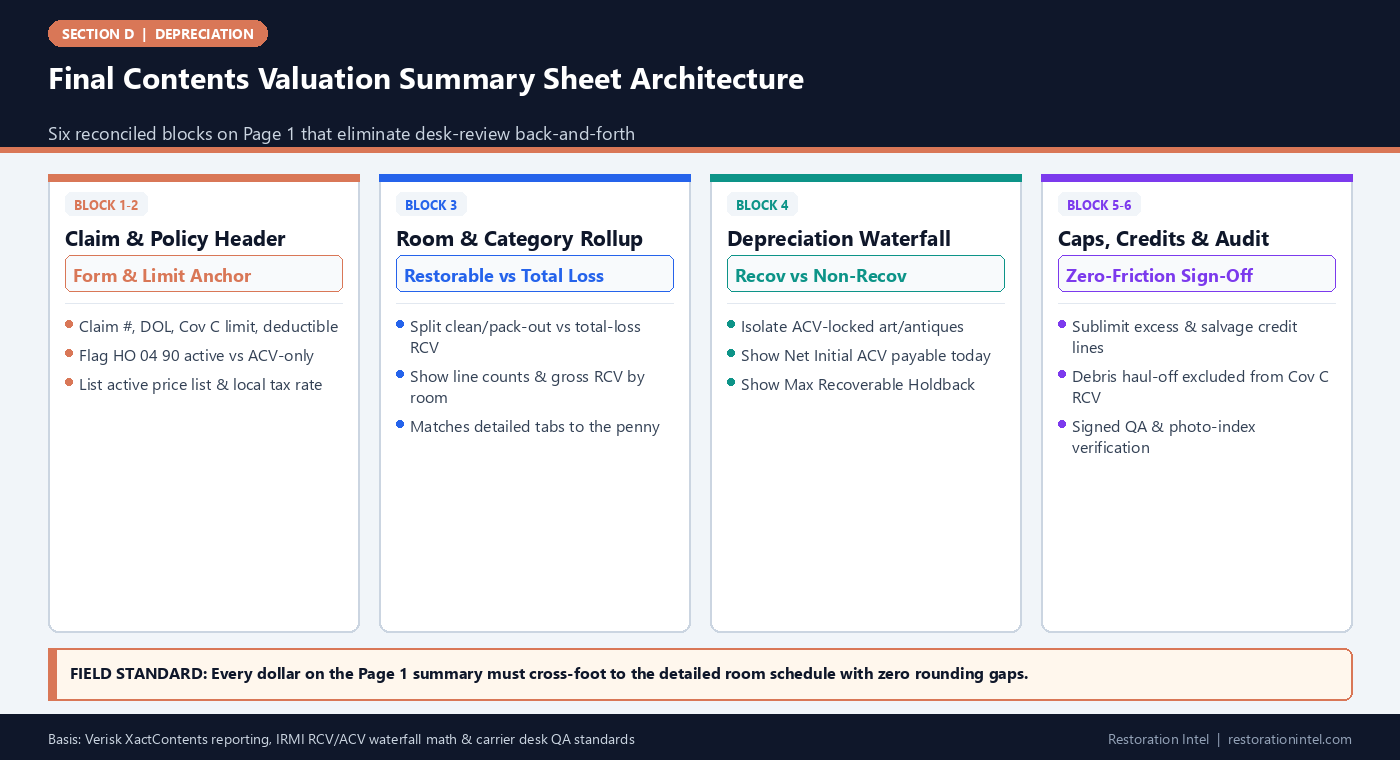
Mandatory Sections of a Carrier-Ready Contents Valuation Summary Sheet
Exact summary blocks, reconciliation formulas, and audit checks required before transmitting any final contents packet.
| Summary Block | Key Fields Displayed | Reconciliation Check | Why Examiners Require It | Common Pre-Send Mistake |
|---|---|---|---|---|
| 1. Policy & Valuation Metadata | Insured, Claim #, DOL, Price List ZIP/Date, Tax %, HO 04 90 status, Cov C Limit | Matches declarations page and carrier file header | Confirms valuation rules & tax rate before opening line tabs | Omitting whether RCV endorsement is active or quoting wrong tax rate |
| 2. Scope Track Split | Restorable Cleaning Scope (S320) vs Total-Loss Replacement Schedule | Zero duplicate items between pack-out cleaning & total loss | Prevents paying cleaning labor AND replacement RCV on same item | Leaving cleaned items inside the total-loss RCV spreadsheet |
| 3. Gross RCV + Tax & Freight | Merchandise Subtotal, Delivery/Installation, Applicable Sales Tax, Gross RCV | Sum of room tabs = Gross RCV to exact cent | Verifies tax wasn't applied twice on web overrides | Including tax-paid checkout screenshots inside taxed unit column |
| 4. Depreciation & Holdback Split | Gross RCV – Recoverable Dep – Non-Recoverable Dep = Gross ACV | Recov Dep + Non-Recov Dep = Total Dep | Separates immediate ACV cash payout from receipt-gated holdback | Treating antiques/memorabilia as recoverable depreciation |
| 5. Sublimits, Salvage, & Deductible | Sublimit Excess Cuts, Owner-Retention Salvage Credits, Deductible | Gross ACV – Caps – Salvage – Deductible = Net ACV Check | Produces exact payable initial disbursement figure | Subtracting deductible inside individual sublimit lines |
| 6. Evidence & Addendum Index | Photo Folder Map, Live-Comp PDF Count, Disposal/Retention Sign-Offs | 100% Tier 1 lines carry linked photo & comp ID | Lets examiner spot-check high-dollar lines in under 5 minutes | Sending unindexed ZIP dumps with mismatched line numbering |
Why Executive Summary Architecture Dictates Approval Speed
Desk examiners review schedules backward from risk: first they check high-level policy alignment (limits, tax rate, endorsement status, and deductible), next they inspect total dollars by room and category, and finally they spot-audit top-decile lines and exceptions. When a submission buries those answers inside 800 scrolling rows, the examiner has to build their own scratch summary just to understand what is being claimed.
Delivering a locked-layout, single-page executive summary at the front of both the PDF packet and the Excel workbook gives the examiner immediate orientation. Combined with clean line-item formatting, an executive summary transforms a dense inventory into a ready-to-audit settlement memo—cutting back-and-forth clarification emails dramatically.
- Cross-foot every subtotal: Run automated Excel SUM checks verifying Room Subtotals = Category Subtotals = Page 1 Gross RCV to the exact cent.
- Keep raw formulas intact: Submit unlocked formula cells (or clean audit-trace columns) in the Excel workbook so examiners can verify multiplication without re-keying.
- Version-stamp every revision: Label the cover sheet clearly (e.g.,
v1.0 Initial Submissionorv2.0 Post-Examiner Reconciliation) with submission date.
Separating Restorable Cleaning Scope From Total-Loss Replacement
On hybrid fire and water losses where half the home is packed out for restoration cleaning under ANSI/IICRC S320 while porous or heavily damaged goods are scheduled for replacement, the single fastest audit failure is overlap. If an upholstered armchair appears on the pack-out cleaning estimate *and* remains inside the total-loss RCV list, the examiner spots double-billing immediately and puts the entire file on hold.
Make mutual exclusivity visible on Page 1. Show two distinct reconciliation lines: Total-Loss Replacement Schedule (Coverage C Indemnity) and Restorable Contents Processing/Cleaning Scope (Mitigation & Pack-Out), plus a brief note confirming that every item cleaned and returned is excluded from RCV replacement—and noting any failed test-clean items transferred cleanly with credit adjustments.
- Unique Item IDs across tracks: Never reuse line IDs between cleaning manifests and total-loss replacement schedules without clear disposition status.
- Reconcile test-clean transfers: When an item fails restoration cleaning, document the transfer from ‘Restorable’ to ‘Total Loss’ and waive or credit duplicate handling where required.
- Keep debris haul-off separate: Confirm on the cover sheet that non-salvageable haul-off labor and landfill fees reside on the mitigation debris invoice, not inside item RCV.
The Depreciation Waterfall, Sublimit Waterfall, and Salvage Ledger
Standard settlement math fails when reviewers cannot follow the exact path from Gross Replacement Cost Value to Net Initial ACV Check. Build a clean vertical waterfall right in the center of the summary sheet: start with Gross Merchandise RCV, add Delivery/Shipping (where applicable) and Sales Tax, subtract Recoverable Depreciation and Non-Recoverable Depreciation to establish Gross Actual Cash Value, then deduct Sublimit Excess adjustments, Owner-Retention Salvage Credits, Prior Advance Payments, and Policy Deductible.
Showing each subtraction on its own named line guarantees nothing gets double-counted. If the insured received a $5,000 emergency advance on Day 3 for clothing and lodging essentials, showing that advance cleanly in the waterfall builds immediate trust with the carrier desk.
- Split recoverable vs non-recoverable clearly: Flag why non-recoverable depreciation exists (e.g., ACV-only policy form vs HO 04 90 excluded antique/art lines).
- List sublimit caps transparently: Reference the exact policy cap applied per category and move excess dollars to an ‘Above-Limit Uninsured’ memo line.
- Show remaining holdback balance: Print ‘Maximum Remaining Recoverable Depreciation Available Upon Replacement Proof’ boldly so insureds and examiners agree on the exact target.
Final Pre-Send QA Gate and Examiner-Friendly Packaging
Before hitting send, run a five-minute pre-flight audit against the completed summary sheet and supporting appendix. Verify that zero lines contain blank ages, zero lines read ‘Misc Lot Qty 1,’ every Tier 1 item over $500 links cleanly to a legible photograph and live or catalog pricing proof, and every PDF live-comp snapshot sits in a clearly labeled folder.
Bundle the deliverable cleanly into a single organized transmittal: (1) Page-1 Executive Summary & Reconciliation PDF, (2) Native formula-enabled Excel/XactContents ESX export with an ‘Examiner Review Notes’ column, and (3) Bookmarked Evidence Appendix PDF (or indexed folder matching Line IDs). Giving an examiner everything required to say ‘yes’ without hunting through attachments is the fastest path to prompt payment.
- Zero blank required columns: Confirm Room, Description, Qty, Unit RCV, Age/Condition, Dep %, Recov Flag, and Source/Photo ID are populated on 100 percent of rows.
- Include an Examiner Response column: Provide empty ‘Approved RCV / Approved Dep % / Examiner Note’ columns in the workbook to speed bilateral reconciliation.
- Archive the frozen send packet: Save an immutable copy of the exact files sent (PDF, XLSX, ESX, evidence folder) for clean version tracking.
Practitioner Verification Checklist (D-26)
- Front-load a one-page Executive Valuation Summary showing policy metadata, room rollups, tax rate, and exact RCV-to-Net-ACV waterfall.
- Cross-foot all room and category tabs to Page 1 totals with unlocked Excel formulas and zero rounding discrepancies.
- Verify zero overlap between ANSI/IICRC S320 restorable cleaning manifests, total-loss replacement lines, and debris haul-off invoices.
- Isolate Coverage C sublimit cuts, owner-retention salvage credits, prior advances, and the policy deductible on distinct waterfall lines.
- Run a final pre-send QA pass confirming zero blank age/condition fields, zero ‘Qty 1 Misc Lots,’ and 1:1 photo/comp linkage on all Tier 1 lines.
Standards, Authority References & Related Reading
Primary standards, insurance definitions, and sibling Restoration Intel guides referenced in this brief:
- Verisk XactContents Platform Overview
- IRMI Insurance Glossary: Replacement Cost Value (RCV)
- IRMI Insurance Glossary: Actual Cash Value (ACV)
- ANSI/IICRC S320 Standard for Professional Contents Restoration
- Related Guide: RCV vs ACV Fundamentals in Contents Claims: How Replacement Cost, Depreciation, and Holdbacks Actually Work
- Related Guide: Recoverable vs Non-Recoverable Depreciation: Policy Mechanics That Control Claim Cash Flow
- Related Guide: Constructing a Contents Depreciation Dispute Packet That Desk Examiners Respect
- Related Guide: Field Guide: Claim Submission Packet QA Checklist (Pre-Send Estimator Gate)
- Related Guide: Which Xactimate Line Items Do Adjusters Actually Approve?
.md twin for desk QA and team training.Frequently Asked Questions
What single element speeds up carrier sign-off on a contents schedule the most?
A clean Page-1 Executive Valuation Summary that cross-foots room totals, separates recoverable vs non-recoverable depreciation, isolates sublimits and salvage credits, and points directly to line-matched evidence.
Should restoration cleaning invoices and total-loss contents replacement schedules be combined into one spreadsheet?
No. Keep restorable pack-out/cleaning bills separate from Coverage C total-loss replacement schedules, while explicitly reconciling both on Page 1 so the examiner sees zero duplicate items.
Why include an empty 'Examiner Decision' column in the Excel workbook?
It lets the desk examiner record line-level approvals or counter-proposals directly inside the same workbook, preventing version drift and accelerating final sign-off.
What file formats should be included in the final contents valuation packet?
Include a Page-1 Summary PDF, the native formula-enabled Excel workbook (plus XactContents .ESX if used), and a line-ID-indexed PDF or folder containing archived retail comps, disposal authorizations, and Tier 1 photos.