Published November 14, 2026. By Will Tygart · Restoration Intel Editorial Desk.
Direct answer. Duplicate line items creep into contents schedules whenever two technicians overlap room boundaries, offline queues re-upload across shifts, or relocated staging piles get re-photographed — requiring strict zone assignment, immutable container IDs, and pre-export duplicate sweeps.

Under-counting costs restoration firms earned revenue; accidental duplicate billing erodes adjuster trust and puts contractor compliance at risk. On large fire or water losses staffed by four-to-eight-person crews working staggered shifts across two days, duplicate line entries rarely come from malice — they emerge naturally from predictable operational handoffs.
Tech A inventories the kitchen peninsula, moves three boxed appliances into the dining hallway to clear workspace, and heads to lunch. Tech B arrives for afternoon staging, sees unwrapped countertop gear sitting along the hallway boundary, and logs them under Dining Room. Add an interrupted basement Wi-Fi upload that retries twice on two devices, and suddenly a $14,000 claim hides $1,800 in phantom double lines unless QA sweeps catch it.
Duplicate Failure Modes & Pre-Export Reconciliation Controls
| Failure Mechanism | How It Happens On Site | Signature Clues in CSV/ESX | Operational Prevention Control |
|---|---|---|---|
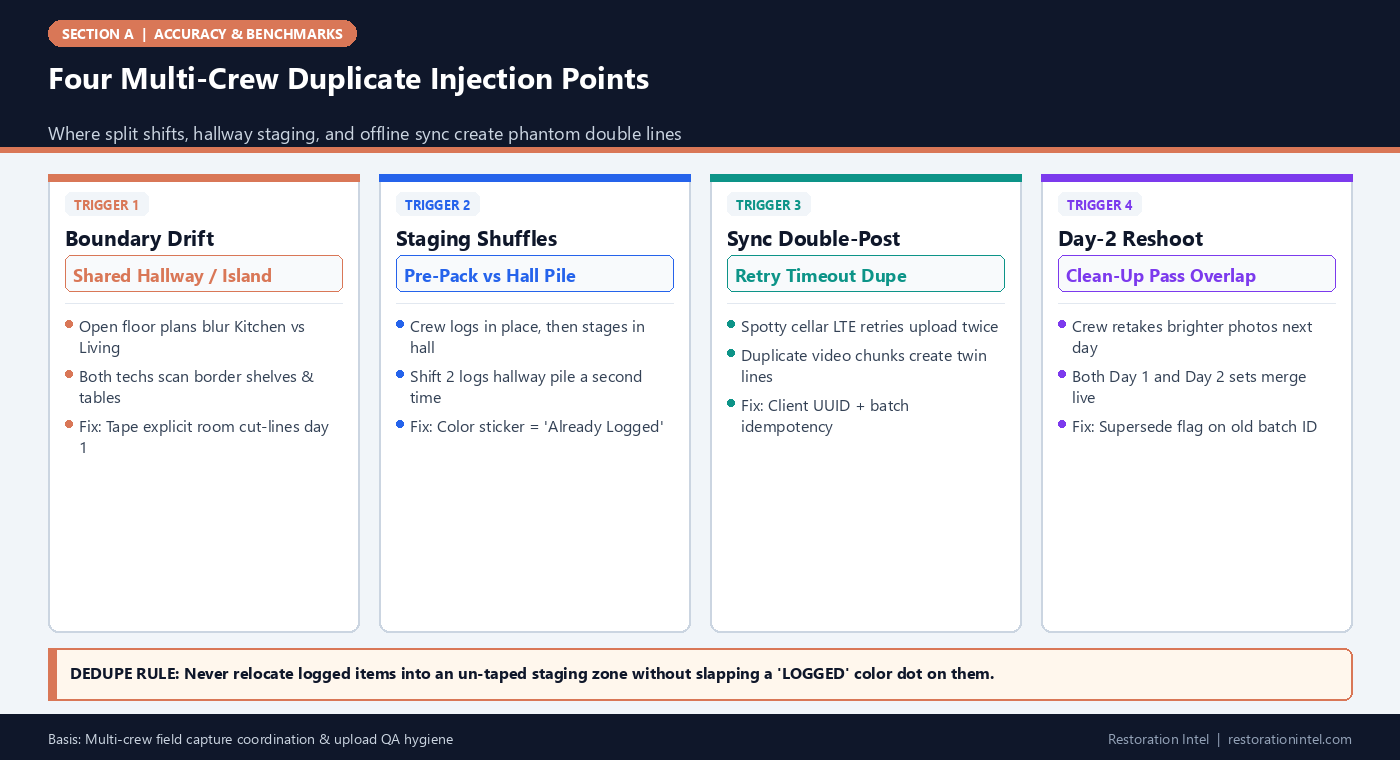
| Room-Border Overlap | Tech A captures Dining Credenza; Tech B includes same credenza edge from Living walk | Identical description/brand appearing across adjacent room tabs | Draw explicit floorplan cut-lines on intake sketch; assign 1 tech per sealed room code |
| Staged Pile Re-Capture | Items inventoried in bedroom get carried to hall staging before boxing and re-shot by relief crew | Items tagged to ‘Hallway’ or ‘Entry’ matching exact bedroom model strings | Place high-vis green/orange ‘INVENTORIED’ dot stickers before moving any item |
| Offline Sync Double-Push | Tablet drops signal mid-upload; operator switches tablets or hits retry creating twin job packets | Clustered identical timestamps & identical photo hashes seconds apart | Audit export by sorting duplicate serial numbers, image hashes, and identical price clusters |
| Split-Shift Reshoot Merge | Morning photos turn out dark; afternoon crew re-shoots full pantry without retiring morning batch | Twice expected pantry item counts across AM & PM timestamps | Retire or archive superseded photo batch before merging room totals |
Why Automated Deduplication Misses Relocated Items
Software deduplication works reasonably well when consecutive video frames or burst stills observe an object sitting stationary in the same corner of a room. When that identical stand mixer gets carried twenty feet onto a blue folding table in the foyer under brighter daylight four hours later, background features change completely — fooling simple visual similarity filters, as explained in our AI deduplication mechanics guide.
Physical visual cues beat algorithmic guesswork on chaotic pack-outs. Giving every crew lead bright painter’s tape or dot stickers marked with Room ID means any item moved to staging visibly signals ‘already logged’ to every worker walking past.
- One room, one capture owner: Avoid assigning two people with two capture devices inside the same tight room simultaneously.
- Tag-then-move: Establish a strict crew rule that no item crosses a doorway until either boxed/barcoded or dot-marked.
Running the Five-Minute Pre-Export Duplicate Sweep
Before pushing any multi-tech or multi-day schedule to a carrier portal, estimators should run three mechanical filters inside their worksheet or estimating database:
First, sort by Model/Serial Number across the entire house — genuine households almost never own two identical washer/dryers or identical serial strings. Second, sort adjacent rooms by exact Unit Price + Item Description to catch border furniture double-counts. Third, check Hallway/Foyer/Staging tabs: virtually anything high-value listed under ‘Hallway’ on a pack-out deserves instant verification that it wasn’t just staged there temporarily from the kitchen or office.
Preventing Sync Retries From Creating Ghost Lines
Field crews working inside concrete basements or rural properties regularly encounter cellular packet drops described in offline queueing workflows. Whenever a crew switches devices mid-day or re-uploads stalled media batches, warehouse QA should reconcile total uploaded photo file counts and verify batch timestamps before pricing begins. Locking each crew upload behind a unique batch ID ensures intermittent retry loops never spawn twin draft rooms silently.
- Confirm uploaded thumbnail totals per room tablet match local queue counts before clearing temporary capture media.
- Document explicit split-shift handoff notes cleanly whenever Relief Shift B finishes packing rooms opened by Morning Crew A.
Field Execution Checklist
- Assign explicit room boundaries on an intake floor sketch so open-concept spaces never get scanned by two techs.
- Apply visible ‘LOGGED’ dot stickers or box numbers before moving any item from its loss room into hallway staging.
- Require full deprecation/archival of morning image batches whenever a room is re-shot for lighting quality.
- Sort multi-tech schedules by Serial/Model ID and exact Description+Price across adjacent rooms before carrier upload.
- Audit ‘Hallway’ and ‘Foyer’ room tabs last to catch temporarily staged furniture from neighboring rooms.
Related Restoration Intel Guides & Reference Standards
- Companion Brief (A-09): Statistical QA Sampling on Large Pack-Outs: How Many Boxes Must Be Verified Before Submission
- Companion Brief (F-07): Deduplication Logic Overlapping Angles Re Shoots Multi Tech
- Companion Brief (F-14): Offline Queueing Edge Compression Sync Flooded Basements
- Internal Guide: The Hands Were Always the Bottleneck
- Internal Guide: Contents Restoration After Fire: Pack-Out Protocols
- Primary Authority: ANSI/IICRC S320 Standard for Professional Contents Restoration
- Primary Authority: Verisk XactContents Platform Overview
- Primary Authority: Restoration Industry Association (RIA)
Frequently Asked Questions
Where do most duplicate line items show up in carrier audits?
On open-concept kitchen/dining/living borders and on ‘Hallway’ or ‘Entry’ tabs where packed/staged items briefly sat in transit.
What if a household genuinely owns identical items like matching nightstands or office monitors?
Legitimate twins belong on one grouped quantity line (`Qty 2` — Pair of matching nightstands) or carry clear distinguishing photo pairs showing both items side by side.
Do adjusters penalize accidental duplicates harshly?
Yes — even honest multi-tech duplicates trigger broader file skepticism and invite line-by-line forensic carrier re-audits that delay payout across the entire claim.
How fast can an estimator spot hidden duplicates before export?
A structured spreadsheet sort on serial strings, high-dollar unit prices, and staging-room tags normally exposes 90%+ of accidental duplicates in under five minutes.
.md twin (duplicate-detection-failures-multi-tech-split-shift-pack-outs.md).