Direct Answer: Electronics depreciate faster than physical furniture because processing power, display standards, and firmware support advance rapidly, yet functional computers, televisions, and smart devices retain meaningful utility value up to a realistic floor and should never be arbitrarily zeroed out when still in daily service.
.md twin for estimator QA and carrier file documentation.
Consumer electronics create some of the sharpest valuation disagreements in contents claims. A homeowner’s four-year-old MacBook Pro or five-year-old OLED television was working smoothly every evening before the smoke event, yet an automated depreciation curve may slash its ACV by 75 to 90 percent while simultaneously mis-matching its replacement to a stripped-down budget model.
Two opposing forces drive electronics valuation: rapid technological obsolescence (which genuinely erodes resale value faster than solid-wood furniture) and real remaining utility value (which ensures an operational device in active use is never worth zero dollars). Handling laptops, desktops, displays, audio receivers, and smart home hardware fairly requires separating RCV tier matching from obsolescence-adjusted ACV—and distinguishing recoverable hardware from non-recoverable cloud data or software.
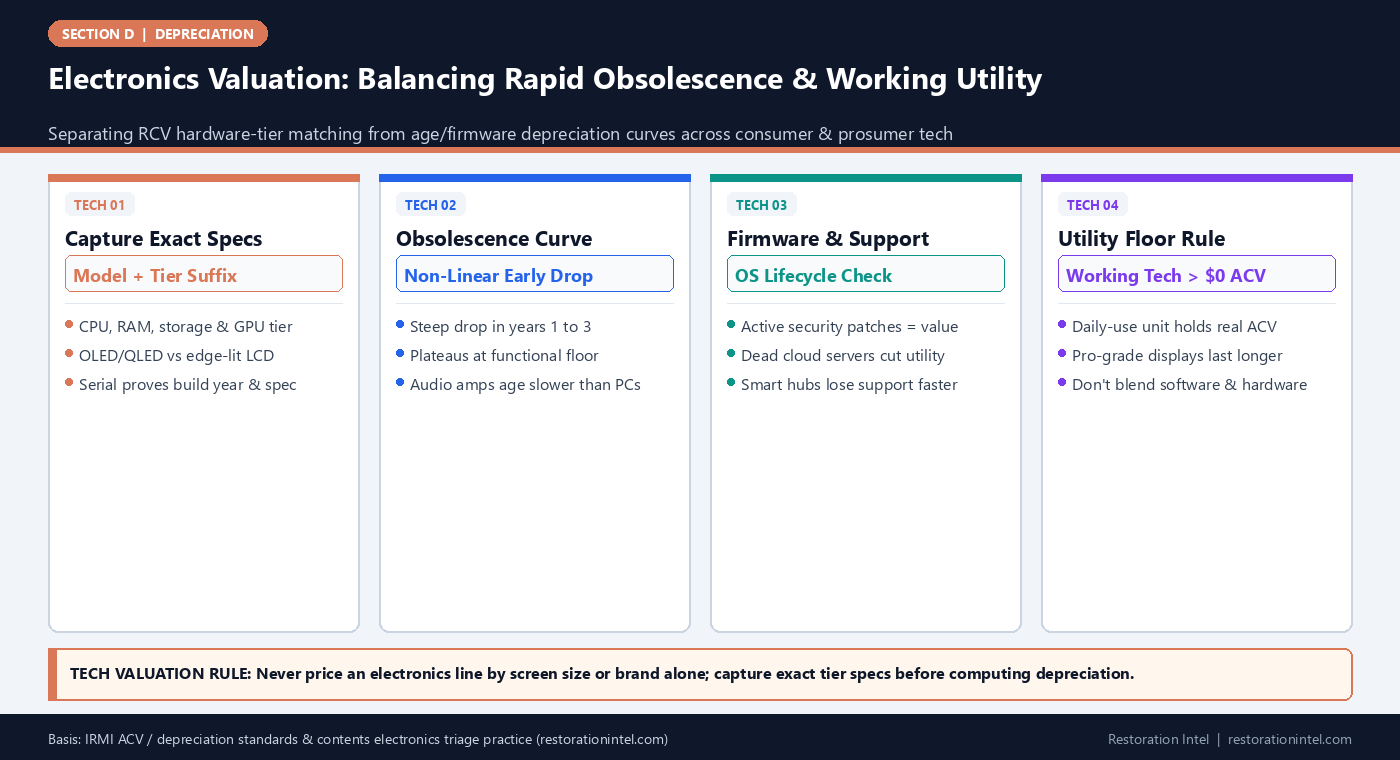
Electronics Valuation: Balancing Rapid Obsolescence & Working Utility
Electronics Depreciation Profiles by Device Class and Obsolescence Driver
Why different categories of electronics age at markedly different speeds despite sitting under one software header.
| Device Class | Primary Obsolescence Driver | Typical Functional Lifespan | Common LKQ Matching Mistake | Fair Valuation Practice |
|---|---|---|---|---|
| Laptops & Desktops | CPU generation, battery wear, OS support lifecycle | 4 to 6 years (pro workstations 5-7 yrs) | Matching a maxed-RAM workstation to a base-spec retail laptop | Match exact RAM/storage/screen tier; apply stepped obsolescence down to utility floor |
| Smartphones & Tablets | Battery degradation, cellular bands, OS update cutoff | 3 to 5 years | Ignoring storage tier (128GB vs 1TB) or unlocked/Pro spec | Verify model/storage via IMEI/serial; keep active working units above zero floor |
| 4K OLED / QLED Televisions | Panel brightness drift, HDMI spec, smart-OS lag | 6 to 9 years | Substituted with lowest-cost 60Hz edge-lit LED of same screen size | Match panel technology (OLED/Mini-LED), refresh rate, and local dimming tier |
| Smart Home Hubs & IoT Gear | Vendor cloud shutdowns, protocol obsolescence, security EOL | 3 to 6 years | Assuming proprietary smart devices stay supported indefinitely | Confirm active vendor support; check if bundled into Structure vs Contents |
| Dedicated Audio / Speakers / Amps | Minimal obsolescence on passive speakers & analog amps | 12 to 25+ years | Applying 5-year computer depreciation to hi-fi speakers or tube amps | Separate passive speakers/turntables onto long useful-life audio schedules |
Why Flat 5-Year Electronics Tables Misprice Entire Categories
Estimating software often groups ‘electronics’ under one aggressive useful-life curve—frequently 4 to 5 years—because smartphones and entry-level laptops turn over quickly. Applying that same curve blindly to every plugged-in device in a home or studio produces wild distortions. Passive floor-standing speakers, studio monitors, DSLR lenses, and high-end solid-state amplifiers do not become obsolete when a new processor ships; quality audio and optics routinely deliver 15 to 25 years of prime service.
Even inside computing and televisions, depreciation is sharply non-linear. A laptop loses substantial resale value during its first 24 months as two newer chip generations arrive, then flattens out as a capable office or student machine through years four and five. Meanwhile, smart devices tied to vendor cloud servers face sudden obsolescence risk if the manufacturer ends security updates.
- Split passive vs smart electronics: Separate speakers, lenses, monitors, and power conditioners from fast-cycling phones and computers.
- Watch battery vs chassis life: Replaceable-battery pro tools and laptops retain higher utility than sealed disposable gadgets.
- Verify pre-loss working status: Stored, non-booting electronics in a closet face strict ACV/obsolete limits under HO 04 90.
Solving the 'Same Size, Wrong Tier' LKQ Trap on TVs and Computers
When field technicians log ’65-inch Samsung TV’ or ‘Dell laptop’ without capturing the exact model code on the rear sticker or underside chassis, estimating desks almost always default to the cheapest current retail unit sharing that brand and size. That single omission can turn a $2,400 calibrated OLED or mini-LED television into a $420 entry-level LED panel, or turn a $2,800 engineering workstation into a $650 consumer notebook.
Under ANSI/IICRC S320 contents documentation standards, rating plates and serial stickers are mandatory capture targets on every electronics line. Even when smoke or water ruins the screen, the rear barcode sticker usually survives long enough to extract exact RAM, storage, processor family, or panel series from OEM lookup tools.
- Capture full sub-model codes: Suffix letters on TVs and laptops distinguish panel types, refresh rates, and processor classes.
- Don’t forget peripherals & licenses: Separate monitors, docking stations, UPS battery backups, and standalone paid software media cleanly.
- Verify custom PC builds: Document individual GPU, CPU, motherboard, and PSU parts via invoices or internal inspection photos rather than using a generic prebuilt desktop.
Cleanability, Soot Corrosion, and Data Recovery Boundaries
Electronics valuation does not happen in isolation from restoration triage. Acidic smoke residues from plastics and wiring corrode micro-circuit boards and solder joints long after visible dust is wiped off, and Category 3 water contamination generally renders dense consumer electronics non-salvageable. Before declaring an item a total loss—or committing to an expensive ultrasonic cleaning cycle—verify whether a certified electronics restoration vendor can warranty cleaning versus replacement ACV.
Policyholders also ask frequently whether lost family photos, business databases, or custom music libraries increase the hardware’s depreciated value. Under standard property policies like HO 00 03 and CP 00 10, hardware RCV covers the physical device and blank storage medium, whereas data recreation or electronic data restoration sits under narrow separate sublimits or specialized cyber/data endorsements.
- Separate data from hardware: Document hard-drive recovery bids separately under electronic data sublimits rather than inflating laptop RCV.
- Require vendor non-salvage letters on specialty tech: Precision electronics over $1,500 often need an authorized bench inspection report to substantiate internal corrosion.
- Check smart-home fixture rules: Hardwired smart thermostats, security panels, and PoE cameras may belong under Building coverage instead of Contents.
Defending Fair Residual ACV on Working Older Devices
Adjusters sometimes apply 90 to 100 percent depreciation to a five-year-old computer or television on the theory that ‘nobody buys five-year-old tech.’ That argument confuses secondary e-commerce liquidation value with Actual Cash Value to the insured. A working workstation or television providing daily household or business service had undeniable functional value immediately before the loss.
Keeping functional electronics above a reasonable residual utility floor (commonly 15 to 25 percent ACV while still actively operated and supported) aligns with IRMI ACV indemnity principles. Documenting daily operational use—alongside clean casing photos and active OS/power status—gives desk examiners a clear basis to honor residual value.
- Prove active service pre-loss: Note desk setup, plugged-in peripherals, or business workflow reliance to refute ‘obsolete attic junk’ assumptions.
- Check RCV holdback eligibility: Remind insureds with HO 04 90 that even heavily depreciated working electronics recover full LKQ RCV once replaced.
- Exclude truly dead storage units: Explicitly separate broken pre-loss electronics found in closets so active equipment credibility stays intact.
Practitioner Verification Checklist (D-08)
- Photograph the rear rating plate, model suffix, and serial/service tag on every computer, TV, monitor, and audio component.
- Record exact internal specifications (CPU, RAM, storage, GPU, OLED/QLED panel) for custom or upgraded configurations.
- Separate fast-obsolescence computers/phones from long-lived passive speakers, lenses, and analog audio equipment in depreciation tables.
- Confirm whether hardwired smart-home systems belong on Structure vs Contents and separate data-recovery costs under policy data sublimits.
- Challenge 90-100% write-offs on actively used, working devices by documenting daily service and realistic residual utility floors.
Standards, Authority References & Related Reading
Primary standards, insurance definitions, and sibling Restoration Intel guides referenced in this brief:
- IRMI Insurance Glossary: Actual Cash Value (ACV)
- IRMI Insurance Glossary: Depreciation
- ANSI/IICRC S320 Standard for Professional Contents Restoration
- Verisk XactContents Platform Overview
- Related Guide: How Useful-Life Depreciation Tables Work — and Where Adjusters and Contractors Misapply Them
- Related Guide: Like Kind and Quality (LKQ) Replacement Matching: Rules for Discontinued Brands and Obsolete Models
- Related Guide: Cleaning Cost vs Depreciated ACV: Navigating the Economic Feasibility Trap on Restorable Contents
- Related Guide: Field Guide: Rating-Plate Locations Cheat Sheet Across Appliances, HVAC, Shop Gear, and Electronics
- Related Guide: S320 Public Review Is Open
.md twin for desk QA and team training.Frequently Asked Questions
Why do computers and smartphones depreciate faster than furniture or appliances?
Rapid processor cycles, battery degradation, and vendor operating-system support cutoffs shorten practical service lifespans, producing steeper early-year depreciation curves than physical casegoods.
Can an adjuster depreciate a working 5-year-old TV or laptop down to zero dollars?
Generally no if the device was actively functioning before the loss. Under indemnity principles, a working asset retains residual utility value, and most estimating standards maintain a positive ACV floor.
What is the most common mistake when valuing damaged TVs and laptops?
Omitting the exact model suffix and internal specs, which causes estimating desks to substitute a low-end entry-level model of the same screen size instead of matching OLED, refresh rate, RAM, or workstation class.
Does contents RCV pay for lost personal files or business data on a damaged hard drive?
Standard contents RCV covers the physical hardware and blank media. Data restoration or recreation costs are typically governed by narrow separate policy sublimits or specialized electronic data endorsements.