Direct Answer: Standardizing field capture attributes—Room, Description, Category/Selector, Quantity/Unit, Brand/Model, Age/Condition, and Action Status—maps cleanly into both Verisk XactContents and Symbility Claims Workspaces, preventing CSV import rejections and manual estimator re-keying.
.md twin for estimator QA and carrier file documentation.
Restoration contractors rarely control which estimating platform a carrier mandates on a given claim. On Monday, a national TPA requires delivery inside Verisk XactContents or Xactimate; by Wednesday, a regional carrier assigns a fire pack-out inside Symbility. When field crews capture notes in platform-specific shortcuts, estimators waste hours reformatting spreadsheets and hunting missing columns.
Built to bridge the operational differences explored in Xactimate vs. Symbility, this reference sheet provides a single field-to-desk schema crosswalk so every room name, quantity, age, condition grade, and photo reference imports cleanly into both ecosystems.
Universal Field Schema -> XactContents & Symbility Map
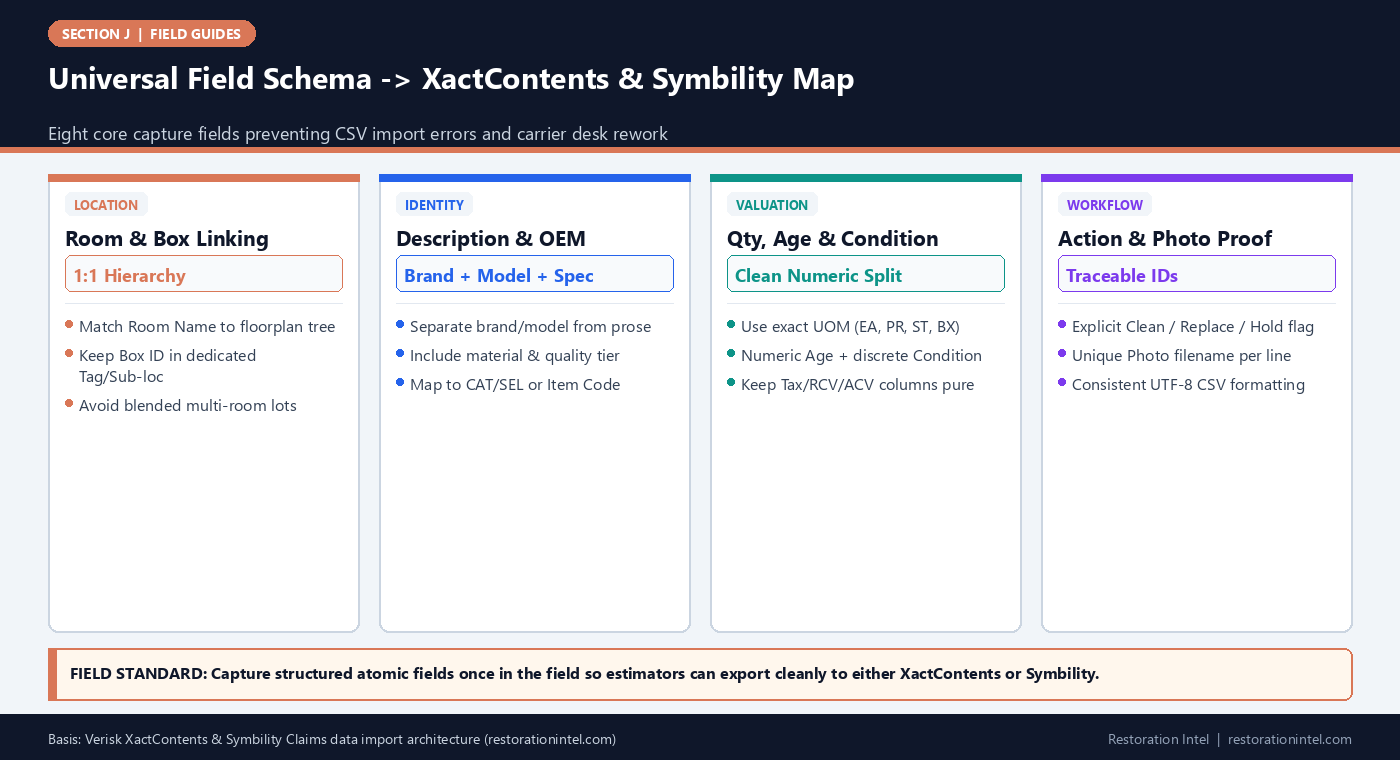
Verisk XactContents vs Symbility Field-Mapping Reference Sheet
Map every raw field-capture column to its exact counterpart in XactContents and Symbility before importing CSV/XLSX schedules.
| Universal Field Attribute | Verisk XactContents Column | Symbility Claims Field | Strict Field Format Rule | Common Cross-Platform Error |
|---|---|---|---|---|
| 1. Room / Area Name | Room / Sub-Room Tree | Area / Room Node | Match sketch/floorplan room name verbatim (e.g., Kitchen, Master Bedroom) | Using Box ID as Room Name instead of physical loss room |
| 2. Line Item Description | Item Description | Item Name / Description | Noun-first structured phrasing: '[Brand] [Item], [Material/Size], [Tier]' | Burying model numbers or damage notes inside unstructured prose |
| 3. Category / Pricing Code | Cat / Sel / Item Group | Category / Sub-Category | Map to standard carrier contents tree (Apparel, Electronics, Appliances) | Using generic 'Misc Household' on scheduled or sublimited goods |
| 4. Quantity & Unit (UOM) | Qty + Unit (EA, PR, ST, etc.) | Quantity + Unit of Measure | Positive numeric Qty; separate Unit column (never '3 pairs' in Qty) | Mixing 'pair' vs 'each' on shoes, drapes, or speakers |
| 5. Brand / Model / Serial | Manufacturer / Model / Serial | Make / Model / Serial # | Dedicated columns; enter 'Unbranded' or 'N/A — Sticker Missing' explicitly | Leaving blank on Tier 1 assets without explaining why missing |
| 6. Age & Condition Grade | Age (Yrs) + Condition (New/Avg/Poor) | Age + Condition Rating | Whole/decimal years in Age; controlled enum in Condition | Typing 'approx 5-7 yrs fair' into a numeric-only Age field |
| 7. Unit RCV / Price Source | RCV Unit Price + Source Note | Replacement Cost + Reference | Numeric currency only; retail URL or catalog SKU in Source Note | Pasting '$' symbols or commas into raw CSV currency fields |
| 8. Disposition & Box/Photo ID | Status (Clean/Replace) + Box/Photo Ref | Action Type + Box/Media Tag | Controlled tag: CLN, RPLC, TSO, HLD + unique Box & Photo ID | Omitting photo ID cross-reference on high-dollar replacement lines |
Why Field Capture Should Be Platform-Agnostic and Atomic
Field crews should never have to guess whether an adjuster wants XactContents or Symbility before starting an emergency pack-out. When mobile spreadsheets or capture apps store atomic fields—keeping `Brand`, `Model`, `Serial`, `Quantity`, `Unit`, `Age`, and `Condition` in separate columns rather than stuffing them into one long text note—export scripts can map the exact same walkthrough into either platform in minutes.
Conversely, free-form paragraph notes (‘LG stainless fridge about 4 yrs old good shape model maybe LRFVS3006S in kitchen’) force estimators to manually split strings line by line across 500-item schedules. Standardizing atomic capture at the point of collection eliminates translation drift regardless of which estimating suite sits on the carrier’s desk.
- One-fact-per-cell rule: Never combine quantity and unit (‘2 sets’) or age and condition (‘5 yrs good’) inside a single spreadsheet column.
- Noun-first descriptions: Start descriptions with the core object type (‘Sofa, 3-Seat Leather, Sectional’) so alphabetical sorting and category auditing stay fast.
- Explicit missing-tag flags: Distinguish ‘Unbranded’ (no maker exists) from ‘Tag Obscured — Photo Taken’ so QA knows the tech actually checked.
Aligning Room Trees, Box IDs, and Disposal Actions Across Both Platforms
One of the most frequent import conflicts between XactContents and Symbility occurs in the location hierarchy. Estimators and desk reviewers inspect losses by **Room of Origin** (Kitchen, Primary Bedroom, Garage) because policy sublimits, spatial peril boundaries, and cleaning/reset billing follow the architectural floorplan. Warehouse managers, meanwhile, track physical custody by **Box ID** (`KIT-004`).
Never overwrite the Room column with a Box ID. Always keep the physical Room Name mapped identically to the mitigation/rebuild sketch—matching the Xactimate workflow discipline discussed in How Do I Write an Estimate in Xactimate?—while placing Box ID and Vault Coordinates in dedicated sub-location or tag fields. Likewise, use consistent disposition enums (`Clean/Restore`, `Replace/Total Loss`, `Clean & Hold`, `Owner Retained`) so XactContents status filters and Symbility action flags reconcile cleanly.
- Sketch-name parity: Copy room titles directly from the mitigation estimator’s floorplan before crews print box labels.
- Dedicated Box-ID column: Keep Box numbers out of the Room tree so duplicate room folders (‘Kitchen Box 1’, ‘Kitchen Box 2’) never clutter the final report.
- Disposition clarity: Separate ‘Non-Salvageable / Replace’ from ‘Non-Affected / Do Not Pack’ so replacement totals never include undamaged rooms.
Handling Depreciation, Condition Grades, and Pricing Sources
Both XactContents and Symbility calculate Actual Cash Value using category useful-life depreciation tables modified by item age and pre-loss condition, though their exact condition tier labels and default age curves differ slightly. Passing clean, objective condition grades (New, Mint/Above Average, Good/Average, Fair, Poor) paired with verified or owner-stated integer age lets the desk apply the platform’s exact depreciation mapping without altering field truth.
When crews capture live retail links or manufacturer MSRP screenshots for discontinued or specialty items, store the clean URL and retrieval date inside a dedicated Reference Note field rather than inside the numeric Unit Price cell. Keeping currency cells purely numeric prevents CSV parsers from throwing type errors during bulk upload.
- Controlled Condition enums: Train field techs on a strict 5-grade rubric rather than inventing subjective adjectives like ‘decent’ or ‘minty.’
- Pure numeric pricing: Keep `$`, currency text, and tax notes out of unit-price numeric cells prior to platform import.
- Source-URL field: Attach verified retail comparison links in the Reference/Note column for every high-value Tier 1 line.
Pre-Import CSV Hygiene Checks That Stop Template Rejections
Even accurate inventories fail platform import when Excel formatting sneaks hidden characters into export files. Leading apostrophes, trailing spaces in room names (‘Kitchen ‘ vs ‘Kitchen’), unescaped line breaks inside note cells, and UTF-16 or Windows-1252 smart quotes frequently break bulk uploaders or split a single line item across three broken rows.
Before sending any field CSV to the estimating desk for XactContents or Symbility ingestion, run a five-point hygiene pass: verify UTF-8 encoding, trim whitespace on Room and Category columns, confirm zero empty required headers, validate numeric Qty and Age values, and verify every high-value line carries a matched photo ID.
- Whitespace trim: Standardize ‘Kitchen’ and ‘Master Bedroom’ capitalization so reports do not split identical rooms into duplicate headers.
- No internal newlines: Strip hard carriage returns inside multi-line item notes before exporting CSVs.
- Photo-ID cross-check: Confirm photo filenames match the attachment folder naming convention expected by the target claims portal.
Practitioner Verification Checklist (J-10)
- Match every field Room Name verbatim to the mitigation and reconstruction sketch floorplan before starting capture.
- Store Brand, Model, Serial, Quantity, Unit, Age, Condition, and Box ID in separate atomic columns rather than combined text notes.
- Use standardized disposition tags (Clean, Replace/Total Loss, Hold, Excluded) that map cleanly to both XactContents and Symbility.
- Strip currency symbols, stray spaces, and internal line breaks from CSV columns and verify UTF-8 encoding prior to import.
- Confirm every Tier 1 high-value line carries an explicit pricing reference note and verified Photo ID cross-reference.
Standards, Authority References & Related Reading
Primary standards, insurance definitions, and sibling Restoration Intel guides referenced in this brief:
- Verisk XactContents Platform Overview
- Verisk Xactimate Estimating Platform
- Symbility Claims Support Portal
- Verisk Property Claims Solutions
- Related Guide: Xactimate vs. Symbility
- Related Guide: How Do I Write an Estimate in Xactimate?
- Related Guide: Field Guide: Standard Abbreviations and Box-Labeling Taxonomy for Multi-Crew Vaults
- Related Guide: Field Guide: Claim Submission Packet QA Checklist (Pre-Send Estimator Gate)
- Related Guide: Estimating Software Price Lists vs Live Retail Links: Audit Rules for Verifying Contents Line Pricing
.md twin for desk QA and team training.Frequently Asked Questions
Should Box IDs be entered in the Room column when uploading to XactContents or Symbility?
No. The Room column must match the physical room of origin on the loss floorplan so carrier sublimits and room summaries work properly. Put Box IDs in a dedicated sub-location, tag, or reference column.
Why do CSV imports split one room into two separate room headings?
Trailing spaces or slight spelling variations such as ‘Living Room’, ‘Living Rm’, and ‘Living Room ‘ create distinct room nodes on import. Always validate against a strict controlled room list.
How should crews handle units like 'pairs' vs 'each' across both platforms?
Keep Quantity numeric and use explicit unit codes (PR for shoes/gloves/speakers sold as matched pairs, ST for matched sets, EA for individual units) so unit pricing never accidentally doubles or halves.
What goes into the Manufacturer/Model column when an item has no label?
Enter an explicit value such as ‘Unbranded’ or ‘Label Missing/Obscured (Photo Verified)’ instead of leaving the cell blank, so desk QA knows the technician inspected the item.