Direct Answer: Commercial office pack-out requires bagging modular workstation hardware by pod ID, removing loose toner hoppers into sealed secondary containment before transport, moving PII/NDA lockboxes under tamper-evident dual-signature custody, and completing electrical/OEM recertification plus floor-plan reset verification.
.md twin for estimator QA and carrier file documentation.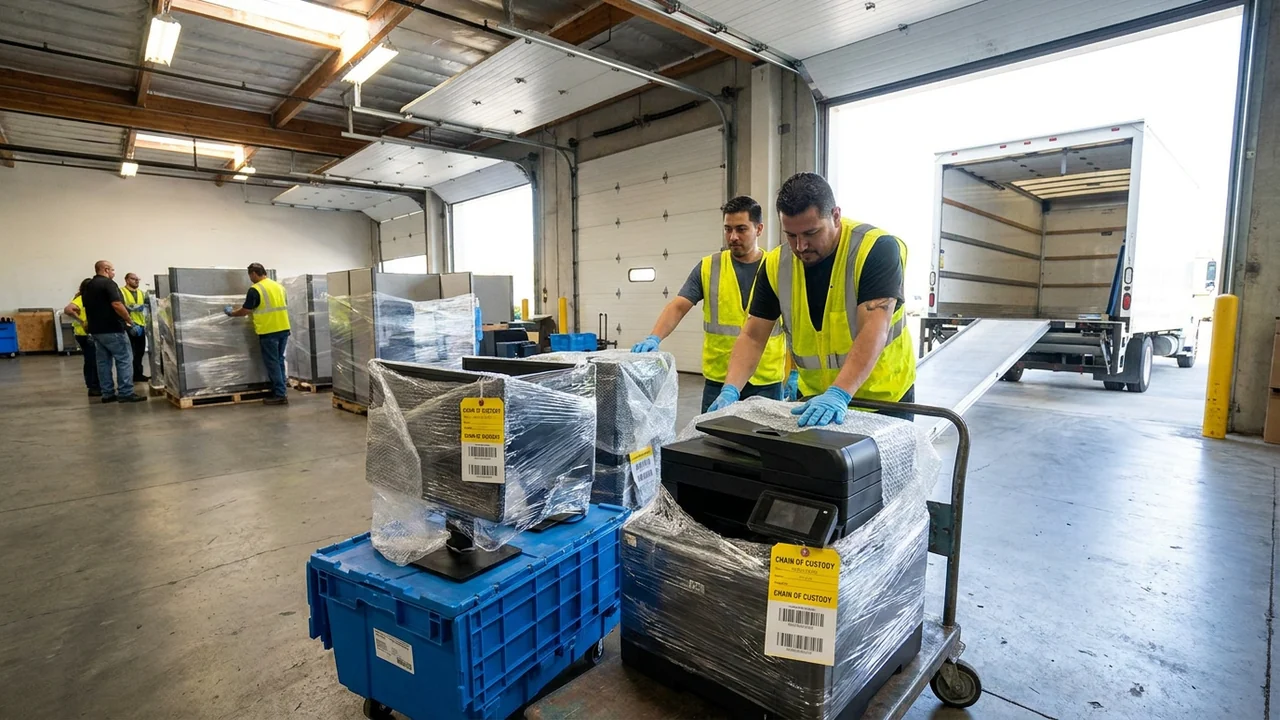
Packing out a commercial office and print suite differs fundamentally from boxing a residence. A single missing bag of proprietary panel splines or cantilevered brackets can halt reassembly of thirty workstations during pack-back; an unsealed waste-toner bottle tipping inside a box truck can contaminate forty clean ergonomic chairs with ultrafine black resin; and an unlogged HR lateral cabinet moved without tamper-evident seals can trigger a corporate privacy investigation.
Under ANSI/IICRC S320 and RIA chain-of-custody standards, commercial pack-outs succeed when every disassembled part, electronic peripheral, consumable container, and confidential lockbox travels with an unbreakable digital and physical audit trail from floor pod to vault rack and back to the rebuilt suite.
Equally decisive is what happens before items return to active desks: post-cleaning odor clearance, safe electrical/OEM recertification of owned print and IT hardware, and a pod-by-pod IT cabling and floor-plan punch list. Compliance and safety disclaimer: Follow OSHA HazCom, PPE, and DOT/commercial transport rules for toners, inks, and lithium battery backups; maintain client privacy-officer custody protocols on all PII/NDA records; and treat this brief as operational guidance rather than legal advice.
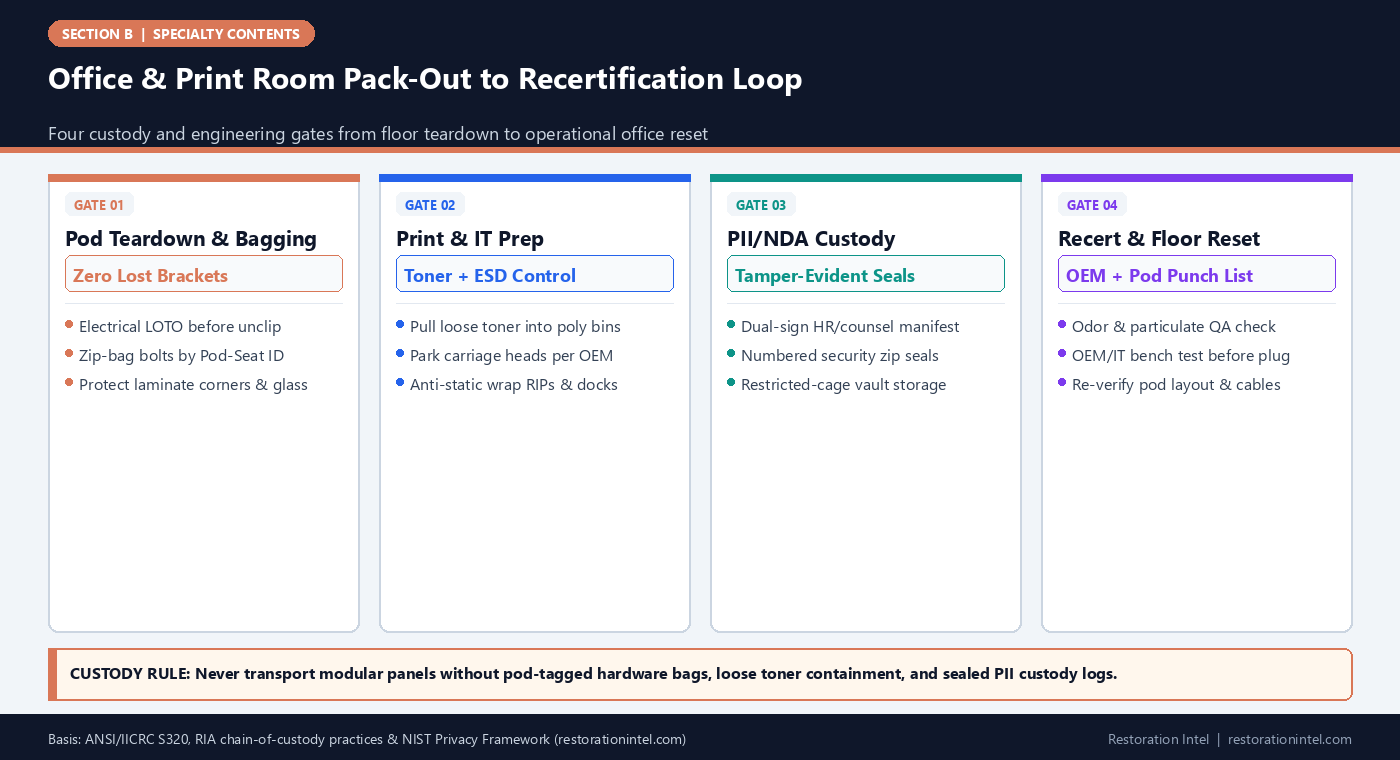
Office & Print Room Pack-Out to Recertification Loop
Commercial Office Pack-Out, Chain-of-Custody & Recertification Standards
Required packing controls, custody sign-offs, and return-to-service gates across office and print-room asset classes.
| Asset Stream | Pre-Pack Disassembly / Prep | Container & Labeling Standard | Chain-of-Custody Control | Recertification / Reset Gate |
|---|---|---|---|---|
| Modular Workstation Panels & Tops | LOTO junction box; unclip whips; bag spline pins & brackets | Edge-guarded A-frames/pallets labeled FL-POD-BAY | Vault pallet barcode linked to pod CAD coordinate | Leveling glide check, licensed electrical whip tie-in, pod layout sign-off |
| Monitors, Docks & Desk Peripherals | Label cable harnesses per seat before unplugging; separate UPS | Anti-static bubble & partitioned monitor crates; upright orientation | IT CMDB asset tag paired to pack-out barcode | Visual port check, electronics bench/IT boot test, dual-screen cable match |
| Owned Print Hardware & Plotters | Park printheads/carriages; remove loose toner & waste bottles | Custom foam/palletized crating; upright tilt indicators | Serial + condition log before forklift/liftgate load | OEM technician inspection, test-print calibration & safety ground check |
| Loose Toner, Developer & Inks | Inspect seals; cap nozzles; isolate cracked cartridges | Sealed poly secondary-containment totes with SDS copy attached | Hazmat/consumable custody log; separate from soft goods | Verify unopened seal integrity or manifested EPA-compliant disposal |
| HR, Payroll & Client NDA Lockboxes | Keep locked cabinets/safes shut; apply tamper-evident seals | Numbered security totes inside locked vault privacy cage | Dual-signature HR/legal release at pickup & return | Intact seal verification by client privacy officer before opening |
| Ergonomic Seating & Soft Furnishings | Inspect moisture/odor status prior to loading | Breathable poly/kraft covers (never trap dampness in stretch film) | Chair barcode tied to Pod-Bay or Conference Room ID | Cleanliness/odor sniff-test QA & pneumatic height/caster function check |
Modular Workstation Disassembly and Hardware-Bag Discipline
Disassembling modular office cubicles at scale without an engineering tagging system turns pack-back into chaos. A single workstation pod contains dozens of small, manufacturer-specific fasteners: top-cap clips, vertical draw-blocks, cantilevered work-surface brackets, modesty-panel Z-clips, base-raceway cover latches, and pass-through electrical jumpers. Generic bins full of loose screws guarantee multi-week delays waiting on backordered OEM brackets during reset.
Require teardown crews to disassemble one pod at a time after electrical lockout verification. Place all fasteners, brackets, and electrical jumper blocks from a single workstation bay into a heavy-mil zip bag marked with the exact pod coordinate (for example, `FL3-POD-B-04-HDWR`), tape or zip-tie that bag directly to the primary panel spine or pack it in a dedicated Pod-B Hardware Crate logged on the manifest, and photograph the assembled junction before unbolting.
Protect laminate edges, frosted glass stackers, and powder-coated frames on upright panel carts or strapped A-frames with corrugated corner boards. Stacking bare laminate desktops face-to-face without foam interleaving causes vibration chafing inside moving trucks that carriers reject as transit damage.
- Never co-mingle pod hardware: Keep brackets, panel glides, and electrical whips bagged per individual Pod-Bay ID.
- Photograph cable-routing channels: Take one quick reference photo of how power whips and data bundles exit each spine before pulling harnesses.
- Use breathable, padded wraps: Interleave desktops with foam sheets and secure upright glass stackers inside marked glass A-frames.
Print-Room Preparation: Toner Hoppers, Plotter Carriages, and ESD Protection
Transporting owned print machinery without mechanical prep destroys precision assemblies that survived the loss. Lock wide-format plotter printhead carriages per OEM instructions, remove loose toner hoppers and waste-toner bottles into upright gasketed secondary-containment totes, tape paper trays shut, and wrap external RIP servers in electrostatic-discharge (ESD) shielding bags—always confirming written lessor permission before touching any leased unit.
Segregate bulk toner, solvent inks, and desk UPS batteries from upholstered office furniture during transport per OSHA HazCom and battery stabilization rules.
- Secondary containment for toner: Move removed toner hoppers and waste bottles upright inside gasketed totes with absorbent pads.
- Lock wide-format printheads: Engage OEM carriage locks or shipping brackets before rolling plotters onto truck liftgates.
- Attach SDS packet to chemical totes: Tape printed Safety Data Sheets onto any crate holding print-room inks or solvents.
Tamper-Evident Chain of Custody for PII, HR, and NDA Lockboxes
When a commercial office packs out, confidentiality liability transfers physically onto the restoration contractor’s truck and vault floor. HR personnel files, payroll ledgers, client tax returns, HIPAA clinic-admin records, and legal NDA lockboxes cannot sit on open warehouse racks beside breakroom chairs or contractor cleaning bays.
Implement the restricted custody controls detailed in Chain-of-Custody Form Elements and Commercial Privacy Pack-Out Rules. Lock or band confidential cabinets and archive boxes on site, apply uniquely numbered tamper-evident security seals across every seam or latch, and record each seal ID on a dedicated Restricted Custody Manifest co-signed by the client’s HR director, privacy officer, or legal representative.
At the restoration facility, store sealed privacy containers inside a badge- or padlock-restricted security cage with access logs—or hand clean, unaffected confidential boxes directly to the client’s swing-space office or bonded records vendor on Day 1 so sensitive files never enter general restoration storage at all.
- Prefer direct swing-space transfer: Whenever unaffected PII/NDA lockboxes can go straight to the client’s temporary office or legal vault under dual sign-off, avoid off-site storage.
- Log tamper-evident seal numbers: Record both pickup seal numbers and intact return seal numbers on the custody form.
- Never open sealed privacy boxes for cleaning: If soot or moisture entered a confidential box, escalate to document-recovery specialists under client NDA authorization.
Vault Storage Zoning and Cross-Contamination Prevention
Commercial office pack-outs frequently sit in storage for months while drywall, ceilings, sprinkler mains, and carpet tiles are rebuilt. Mixing uncleaned smoke-loss panels with deodorized seating—or sealing damp upholstery in tight stretch film—ruins salvageable assets mid-claim.
Maintain Dirty-to-Clean plant zoning per ANSI/IICRC S320: route incoming fire-exposed furniture through negative-air dry extraction and deodorization before moving verified clean items into breathable covers inside climate-controlled, RH-logged vault racks.
- Wrap clean goods to breathe: Use breathable kraft pads and vented dust covers on stored seating—reserve tight stretch wrap for base pallets.
- Separate odor-offgassing lots: Keep cleaned conference chairs away from active thermal-fogging bays or uncleaned smoke pallets.
- Maintain warehouse RH logs: Log daily vault temperature and humidity to prove stable preservation across multi-month TI build-outs.
Recertification, Electrical Safety Testing, and Pod-by-Pod Floor Reset
Returning a commercial office from storage is not complete when movers unload boxes onto new carpet tiles. Workstations require mechanical re-leveling, electrical continuity checks, IT peripheral re-patching, and—for owned print and electronic assets—documented recertification before employees sit back down.
Before plugging restored monitors, docking stations, shredders, or owned printers back into newly rebuilt suite circuits, require documented safety and functional verification: clean inspection sign-off, electrical ground/leakage testing or bench burn-in for electronics, and OEM-authorized calibration/test-print verification on production print hardware. Never ask facility staff to power up restored machinery solely on visual cleanliness.
Finally, execute a staged pod-by-pod reset aligned with the pre-pack CAD map. Reassemble modular panel spines, have a licensed electrician reconnect wall whips and ceiling power poles, verify IT dock-to-monitor mapping at each seat, and walk the completed floor with the facilities manager and HR lead to reconcile every tamper-evident privacy seal and produce a signed zero-exception completion certificate.
- Require pre-power electronics QA: Attach bench-test or OEM recertification sheets to every restored print unit and electronics lot before site delivery.
- Sequence trades cleanly at reset: Coordinate modular installers, licensed electricians (whip tie-ins), and client IT cabling teams so workstations aren’t blocked half-built.
- Close the custody loop: Have the client sign off on intact PII seal numbers, pod furniture counts, and operational function on the final reconciliation log.
Practitioner Verification Checklist (B-56)
- Confirm licensed electrical lockout/tagout (LOTO) at wall boxes and ceiling poles before disassembling modular workstation panel spines.
- Bag all panel clips, brackets, and electrical jumpers per Pod-Bay ID and interleave laminate desktops with foam inside upright panel carts.
- Remove loose toner hoppers and waste-toner bottles into upright sealed secondary-containment totes, lock plotter carriages, and ESD-wrap RIPs/docks.
- Seal all HR, payroll, and client NDA lockboxes with numbered tamper-evident tags under dual-signature custody and store inside restricted access cages.
- Enforce Dirty-to-Clean vault segregation, breathable clean-storage covers, and daily climate/RH logging throughout commercial TI reconstruction.
- Complete OEM/electronics recertification tests, licensed electrical whip reconnection, IT seat patching, and signed pod-map reconciliation before closeout.
Standards, Authority References & Related Reading
Primary standards, insurance definitions, and sibling Restoration Intel guides referenced in this brief:
- ANSI/IICRC S320 Standard for Professional Contents Restoration
- ANSI/IICRC S700 Fire & Smoke Restoration Standard
- Restoration Industry Association (RIA)
- OSHA 1910.132 Personal Protective Equipment Standard
- OSHA Hazard Communication Standard (HazCom)
- NIST Privacy Framework
- Related Guide: Commercial Offices, Workstations & Print Rooms: Scope & Hazard Boundaries
- Related Guide: Commercial Offices, Workstations & Print Rooms: Capture, Serial & Provenance Logging
- Related Guide: Commercial Offices, Workstations & Print Rooms: Valuation, LKQ Sourcing & Policy Traps
- Related Guide: Field Guide: Chain-of-Custody Form Elements & Pack-Out Sign-Off Template
- Related Guide: Field Guide: HIPAA, FERPA, and Trade-Secret Privacy Rules During Commercial & Clinic Pack-Outs
- Related Guide: SPC-DATA-REC: The Value Is the Data, Not the Drive
.md twin for desk QA and team training.Frequently Asked Questions
How do crews avoid losing modular cubicle connectors during a large commercial pack-out?
Disassemble one pod at a time, place every bracket, spline, and electrical jumper into heavy zip bags labeled with the exact Floor-Pod-Bay ID, and log hardware totes directly onto the pod manifest.
What special precautions apply when transporting commercial printers and plotters?
First confirm written lessor/OEM permission on leased gear. For cleared units, remove loose toner cartridges and waste-toner bottles into upright sealed poly bins, engage OEM plotter carriage locks, and wrap controllers in ESD shielding.
How should confidential HR or NDA lockboxes be stored during a multi-month rebuild?
Whenever possible, transfer unaffected sealed boxes directly to the client’s swing space or counsel under dual-signature receipt. If stored in the restoration vault, apply numbered tamper-evident seals and lock them inside a restricted-access privacy cage.
Why shouldn't restored office chairs be tightly sealed in plastic stretch wrap for months?
Tightly sealing soft upholstery traps residual cleaning moisture or temperature-swing condensation inside cushions, risking mildew growth and vinyl sticking. Use breathable kraft pads or vented dust covers in climate-controlled storage.
What proves restored office electronics and print gear are safe to plug back in?
Documented electronics bench testing, electrical ground/insulation checks, or written OEM technician recertification—paired with licensed electrical sign-off on reconnected workstation power whips.