Published November 14, 2026. By Will Tygart · Restoration Intel Editorial Desk.
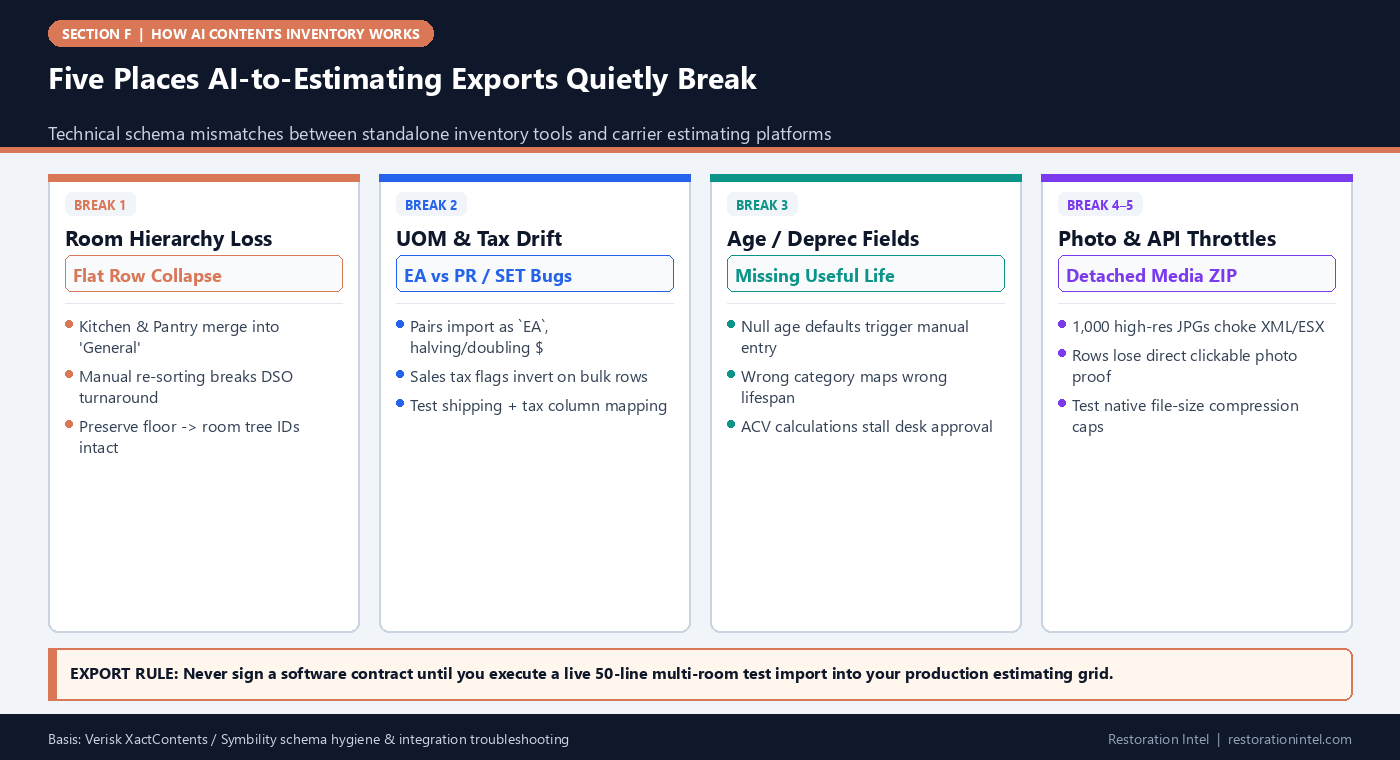
Direct answer. Many AI inventory trials collapse at the export boundary — losing hierarchical room folders, distorting Units of Measure, stripping age/depreciation metadata, or throttling 400+ attached line-item photos during XactContents, Symbility, or CSV import.

Software demos rarely finish inside the estimator’s live production grid. Vendors show clean web tables inside their own browser tab and simply mention ‘Yes, we export to Xactimate/XactContents and Excel.’ Operations directors discover the painful details on Claim #1 after buying an annual contract: the CSV won’t import cleanly without thirty minutes of Excel macro surgery, room tags collapse into one flat list, depreciation defaults reset to zero, or photos land unlinked inside a separate ZIP folder.
Inspecting exact export mechanics before adoption prevents hidden workflow bottlenecks. Whether pushing packets into Verisk XactContents, Symbility, or carrier-formatted spreadsheets, integration reliability lives inside rigid data schema details.
Estimating Export Schema Checklist Across Major Carrier Pathways
| Export Dimension | XactContents / Xactimate Needs | Symbility / Carrier Portal Needs | Spreadsheet Fallback (CSV/XLSX) Trap | Pre-Purchase Verification Test |
|---|---|---|---|---|
| 1. Room & Zone Tree | Strict hierarchy matching claim rooms without orphan duplicates | Consistent Room/Area grouping mapped cleanly to claim structure | Free-text `kitchen` vs `Kitchen 1` splits totals into broken pivot tabs | Verify exact room summary subtotals match post-import |
| 2. Category & Selector Match | Normalized Cat/Sel classification or clean mapped catalog strings | Symbility category branch alignment + quality grade field | Informal nouns break carrier VLOOKUP / auto-depreciation macros | Test 10 specialty items (electronics, tools, rugs, linens) |
| 3. Depreciation Inputs | Age (yrs/mos), Condition code & Depreciation % preserved | Age + Condition rating mapped to carrier lifespan table | Blank age columns force manual editing across 400 rows | Confirm imported lines retain Condition + Age estimates cleanly |
| 4. Image Attachments | Line-bound thumbnails inside size caps without crashing import | Attached per-item photo links within portal payload limits | Separate unlinked `photos/` folder leaves Excel rows orphaned | Import a 50-line file with 100 photos and inspect speed + linkage |
| 5. RCV / ACV & Custody IDs | Clean unit price, tax, RCV/ACV parity + box ID reference field | Box/Custody reference + claim number alignment preserved | Formula-broken currency text (`$1,200.00` string vs numeric) | Verify Excel sum totals and ESX RCV totals reconcile to $0.00 |
Testing Round-Trip Fidelity Before Production Rollout
In software engineering, round-trip testing confirms data survives translation out and back cleanly. Apply the exact same rule to contents platforms during evaluation: build a compact 50-item packet containing paired shoes (`PR`), multi-piece cookware (`SET`), serialized appliances, a sealed box lot, and mixed condition codes, then run the vendor’s actual import sequence into your live desk setup — including checking formatting expectations documented in our Xactimate vs. Symbility comparison.
Time how many clean manual clicks your estimator needs after import before clicking ‘Submit to Carrier’. If that ‘quick cleanup’ takes thirty minutes on fifty items, multiply it by eight for a 400-line fire claim.
- Check image weight packaging: Uncompressed 12MB smartphone photos embedded across 400 lines produce multi-gigabyte import bundles that timeout web portals; verify clean smart resizing (~1200–1600px JPEG) on export.
- Verify character encoding cleanly: Quotes, accented furniture brands, and fractions (`1/2″`) inside descriptions occasionally break naïve CSV parsers unless properly escaped UTF-8.
Keeping Box Custody Anchors Alive Across Estimating Formats
Notice one common blind spot when bridging estimating tools and warehouse operations: XactContents prioritizes claim valuation, whereas pack-out managers track `Vault #14 / Box #088`. Always confirm your export schema carries a clean persistent Box/Custody Reference ID inside a standard note or item-tag column so warehouse returns trace smoothly back to carrier-approved lines.
Why Formatted Companion PDFs Still Matter Alongside ESX/CSV
Even when native XML/CSV imports succeed cleanly, carrier examiners and policyholders frequently review multi-hundred-line files as human-readable visual packets. Tools that automatically output both structured estimating spreadsheets AND clean room-grouped photo proof sheets cut communication friction dramatically.
Field Execution Checklist
- Run a live 50-item test import into your real XactContents, Symbility, or carrier portal workflow BEFORE vendor sign-off.
- Confirm room folders, age/condition fields, depreciation categories, and unit multipliers (`EA`, `PR`, `SET`) survive untouched.
- Verify line-item photo attachments export compressed cleanly within carrier portal megabyte limits without detaching from rows.
- Ensure Box/Vault Custody IDs remain mapped inside export notes/columns so warehouse logs stay tethered to pricing lines.
- Inspect numeric formatting (`USD`, tax flags, fractional quantities) so no text-string parsing glitches corrupt claim totals.
Related Restoration Intel Guides & Reference Standards
- Companion Brief (F-08): Taxonomy Mapping: Translating Raw AI Object Labels Into XactContents and Carrier Category Trees
- Companion Brief (F-01): How AI Contents Inventory Works End-to-End: From Field Capture to Carrier-Ready Schedule
- Companion Brief (F-16): How to Evaluate Any AI Contents Inventory Vendor: 12 Verification Questions Beyond Marketing Demos
- Internal Guide: Xactimate vs. Symbility
- Internal Guide: How Do I Write an Estimate in Xactimate?
- Primary Authority: Verisk XactContents Platform Overview
- Primary Authority: Xactware Estimating Suite
- Primary Authority: Symbility Claims Support Portal
- Primary Authority: Verisk Property Claims Solutions
Frequently Asked Questions
Do AI contents tools connect directly to Xactimate via official APIs?
Some platforms use licensed integrations or structured import files/macros while others rely on formatted CSV/XLSX templates — verify live compatibility directly inside your own Xactimate/XactContents instance.
What causes photo attachments to fail during large claim imports?
Shipping multi-megabyte native smartphone photos raw inside XML/ESX containers often hits memory or portal upload caps; optimized resized JPEGs avoid stalls.
Why do exported age and condition fields matter so much?
Without preserved age and condition estimates, estimating platforms calculate incorrect initial Actual Cash Value (ACV), forcing estimators to edit hundreds of rows manually.
Can one spreadsheet format satisfy both XactContents and Symbility?
Rarely natively — each platform expects distinct column headers, selector mapping conventions, and unit formats, though unified backend pipelines can output both cleanly.
.md twin (xactcontents-symbility-spreadsheet-export-mechanics-integrations.md).