Direct Answer: Office and print-room capture requires mapping workstations by numbered floor-plan pods, logging OEM model/serial and lease tags across monitors, docks, and print hardware, recording pre-loss system specs for discontinued cubicles, and keeping sensitive PII/NDA text out of claim photo galleries.
.md twin for estimator QA and carrier file documentation.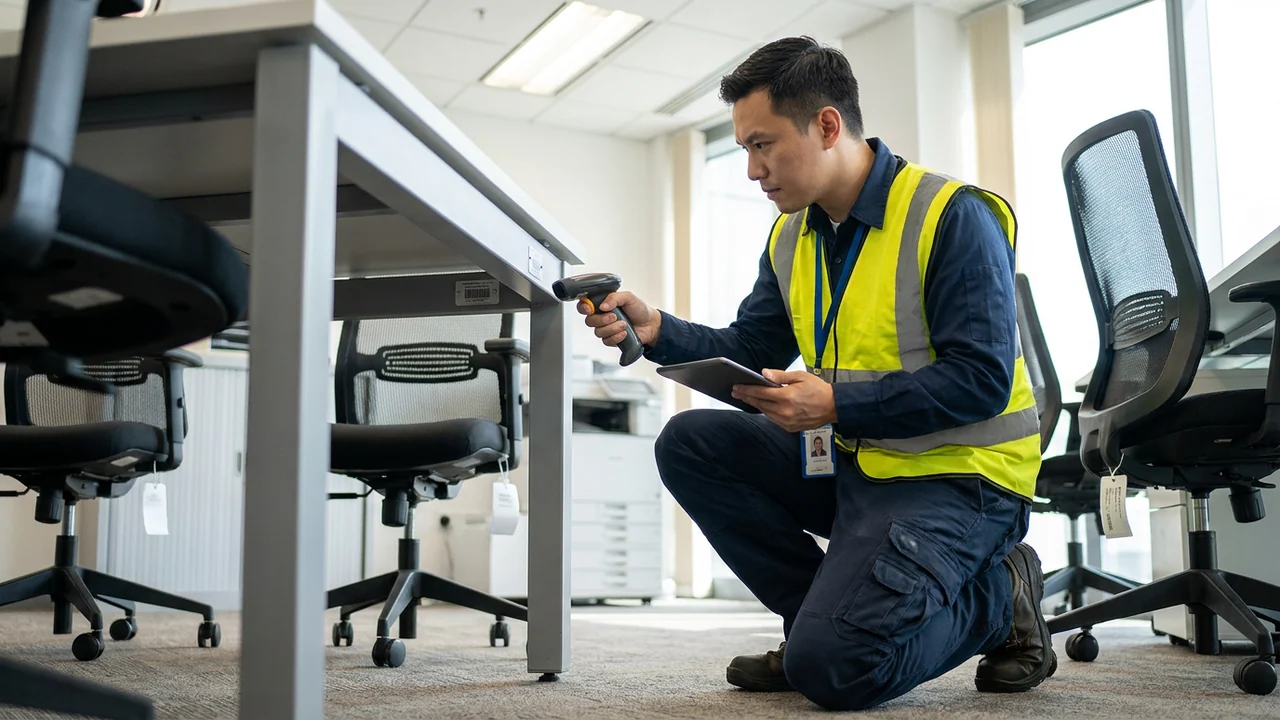
Open-plan offices and corporate print centers look deceptively repetitive during a loss walkthrough. Forty identical-looking workstations each hold a sit-stand frame, three panel screens, two monitors, a docking station, an ergonomic task chair, and a pedestal file. When field crews log that floor as “40 desks and 80 monitors — soot damaged,” desk examiners immediately reject the schedule for missing model specs, serial numbers, condition grades, and ownership proof.
At the opposite extreme, technicians who unbolt every cubicle panel and peel apart nested docks before building a spatial map create a matching nightmare later: nobody knows which curved return desk belonged to pod B-14 or which leased copier finisher paired with the third-floor RIP controller. Following ANSI/IICRC S320 and RIA documentation practices, effective capture pairs spatial pod indexing with macro rating-plate verification.
Commercial office capture also carries strict confidentiality guardrails under the NIST Privacy Framework. Camera operators must capture serial plates, pre-loss wear, and peril evidence without turning employee tax forms, medical notes, or client NDA documents into high-resolution attachments inside shared claim portals. Disclaimer: Operational capture guidance here supports claim substantiation and fixed-asset reconciliation; always follow client IT security, HR privacy, and legal-hold instructions before photographing or exporting office records.
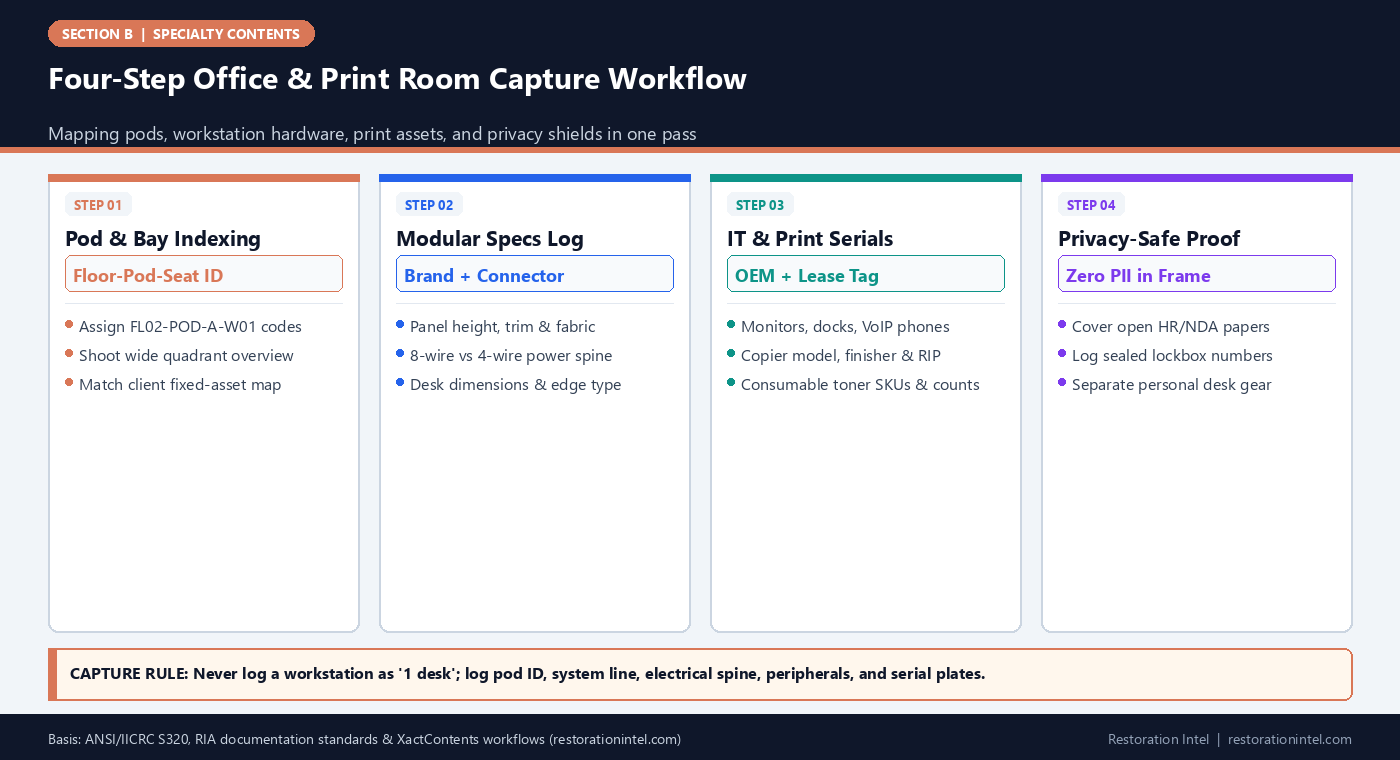
Four-Step Office & Print Room Capture Workflow
Office & Print Room Capture Specification & Provenance Checklist
Required field data points by asset class to support cleanability triage, LKQ matching, and carrier audit sign-off.
| Asset Category | Primary Location / Tagging ID | Critical Manufacturer & Spec Fields | Serial / Provenance Evidence | Privacy & Pre-Loss Condition Notes |
|---|---|---|---|---|
| Modular Workstation Panels & Desks | Floor-Pod-Bay code (e.g., FL3-PA-04) | OEM system line, panel height/width, fabric/glass/laminate tier, 4- vs 8-wire harness | Under-surface manufacturer sticker, purchase order, facilities CAD layout | Document edge-band swelling, cam-lock separation, pre-existing scuffs |
| Ergonomic Task & Conference Chairs | Paired Pod-Bay ID or Conference Room # | Brand/model (e.g., mesh vs leather, synchro-tilt, lumbar, arm type) | Under-seat date/model label, upholstery fire-code tag (CAL 133) | Note pre-loss caster wear, cylinder sag, or armrest cracks |
| Desk Peripherals (Monitors, Docks, VoIP) | Pod-Bay + User Seat # | Screen size, resolution/panel class, Thunderbolt/USB-C dock wattage, VoIP model | Rear OEM serial plate + client IT asset barcode sticker | Do not boot wet electronics; check IT CMDB asset export |
| Print-Room Copiers, Plotters & Finishers | Print Room Asset # (PR-01A, PR-01B) | Base engine model, attached finisher/feeder/RIP server SKUs, ink/toner system | Chassis serial plate + third-party lease/dealer service decal | Record meter reading if screen already safely active; never energize wet units |
| Print Consumables & Paper Stock | Print Supply Rack / Shelf ID | OEM vs remanufactured cartridge SKU, color channel, specialty paper weight/size | Unopened box barcodes, invoice/PO logs, shelf-count photos | Flag ruptured toner seals vs factory-sealed moisture-barrier cartons |
| Confidential Files & NDA Lockboxes | Restricted Custody Log ID (SEC-01) | Container type (4-drawer lateral, fireproof safe, sealed banker box) | External lock/key number and serialized tamper-evident seal tag | Mask or flip exposed papers before shooting; zero readable PII in photos |
Pod-Based Spatial Indexing for Repetitive Workstation Floors
Standard room-by-room residential capture collapses inside a 15,000-square-foot commercial floor plate. Dumping 180 desks, 360 monitors, and 60 pedestals into one flat “Open Office” list makes downstream verification impossible for estimators and adjusters alike. Every workstation pod needs a deterministic coordinate system before the first barcode sticker is applied.
Start with the tenant’s evacuation map, seating chart, or CAD plan, assigning permanent markers (for example, `FL3-NORTH-POD-C-06`) anchored to column lines or window mullions—mirroring Universal Capture Order. Consistent pod prefixes also let estimators reconcile surviving pods against the client’s fixed-asset ledger per Commercial BPP Pre-Loss Schedules.
- Lock pod IDs to architecture: Anchor cluster numbering to permanent columns or window mullions so IDs survive furniture teardown.
- Pair wide and macro frames: Shoot one wide workstation-bay overview followed immediately by under-desk labels and peril close-ups.
- Separate enclosed rooms: Log private offices, conference rooms, and huddle booths under distinct room IDs rather than open-floor counts.
Logging Modular System Specs, Power Spines, and Hardware Labels
Office furniture value shifts sharply by manufacturer line and electrical architecture. Two six-foot cubicles that look similar from the aisle can differ substantially depending on whether they use budget laminate panels or steel-frame systems with eight-wire four-circuit raceways, acoustic mineral cores, and electric sit-stand bases.
Capture OEM build stickers underneath main work surfaces, inside panel wire channels, beneath chair seat pans, and on pedestal back rails. Recording panel heights, glass stackers, corner posts, and power-pole feeds—alongside pre-loss wear per Pre-Pack Inspection rules—gives estimators exact provenance for Like Kind and Quality (LKQ) matching.
- Capture under-desk order tags: Use a compact mirror or macro light to photograph OEM build labels under work surfaces and chair pans.
- Count circuits and raceways: Note 4- vs. 8-wire base-feed whips, beltline data knockouts, and integrated task-light power supplies.
- Document pre-existing wear: Log worn armrests, chipped laminate edges, or faded fabrics upfront so pre-loss condition is indisputable.
Print-Room Hardware, Finishers, RIP Servers, and Consumables
Commercial print lines operate as coupled production stacks: a main print engine paired with an external RIP (Raster Image Processor) server, high-capacity paper feeder, booklet saddle-stitcher, and hole punch—each carrying its own serial plate and often separate service contracts.
Photograph the assembled print line first, then capture each module’s OEM serial plate and third-party lease sticker. Count sealed OEM toner cartons, drums, and wide-format media rolls separately from open or compromised supplies, and pull meter pages only on dry, already-active units cleared by safety leads.
- Log every module separately: Never collapse a main copier engine, external finisher, and RIP server into one vague ‘printer’ line.
- Record both OEM and vendor tags: Capture factory serial plates alongside managed-print service stickers showing dealer contact and contract ID.
- Count consumables by sealed status: Separate factory-sealed toner boxes from opened or soot/water-compromised supplies.
Reconciling IT Peripherals With Client Asset Ledgers Without Energizing Wet Gear
Workstation desks house dense clusters of IT peripherals: dual 27-inch monitors, universal Thunderbolt docks, wireless keyboards, webcams, speakerphones, desk UPS battery backups, and barcode scanners. Unlike the primary laptop an employee carried home the night before, desk-mounted peripherals usually absorb the brunt of overhead sprinkler water or ceiling soot.
Never plug in or test damp monitors, UPS units, or docking stations just to read a model number off an on-screen menu. Physical chassis labels on the rear panel or underside carry the exact model number, revision, and serial string—and pairing those serials with the client IT department’s Configuration Management Database (CMDB) or MDM/asset export cuts capture time dramatically while eliminating model-guessing.
Flag uninterruptible power supply (UPS) bricks under desks separately during capture. Lead-acid or lithium-ion battery packs exposed to fire heat or water intrusion require stabilization notes under lithium-ion and battery stabilization rules before pack-out crews box them.
- Capture both IT tag and OEM serial: Photograph the company’s barcode asset tag and the factory serial sticker in the same frame whenever possible.
- Pull IT asset exports early: Request a CSV export of monitors, docks, and VoIP serials from IT to reconcile against physical floor sweeps.
- Separate desk UPS batteries: Log under-desk battery backups with chemistry/condition notes so swollen or wet units are never packed into closed cartons.
Privacy-Compliant Capture Around Active Desks and Vital Records
Capturing detailed photographic evidence in an active corporate office creates an immediate tension with data privacy. Open desk blotters hold sticky notes with network passwords; inbox trays hold signed customer credit-card authorizations, employee medical accommodations, or merger drafts; print-room output trays hold uncollected payroll checks. Once those images enter an estimating platform or carrier portal, dozens of external adjusters, reviewers, and subcontractors can view them.
Under NIST Privacy Framework data-minimization principles and XactContents & Symbility mapping workflows, crews should apply a strict “No Readable Text” rule for confidential papers. Use opaque privacy cover sheets over active desk documents before shooting wide establishing photos, photograph locked cabinets only from the exterior showing waterlines or soot patterns, and log contents of confidential drawers by generic volume and container seal ID rather than spreading client records across the floor for photo documentation.
Where paper records themselves suffered wet or smoke damage, transition those items immediately to a restricted vital-records inventory aligned with document freeze-drying protocols rather than mixing them into standard office-supply counts.
- Use privacy cover sheets: Place blank opaque blotters over visible desktop papers before taking wide workstation orientation shots.
- Audit photo batches before upload: Run a quick QA scan at shift end to redact or delete any accidental frame capturing legible PII, credentials, or financial routing numbers.
- Bridge capture to triage: Tag water-wicking edges, soot wipe-tests, and corrosion points cleanly to feed B-54 cleanability triage.
Practitioner Verification Checklist (B-53)
- Obtain the client’s floor plan or seating map and assign deterministic Floor-Pod-Seat IDs before photographing or unclipping any workstation.
- Photograph under-desk OEM build labels, panel heights, fabric/glass tiers, and 4- vs 8-wire power-spine configurations for every cubicle type.
- Log print-room presses, finishers, external RIP servers, and plotters as distinct modules with both OEM serial plates and third-party lease stickers.
- Capture rear serial plates and company IT asset barcodes on monitors, docks, and VoIP phones without energizing wet or soot-exposed units.
- Count print-room toner, developer, and specialty paper stock by SKU and note whether factory moisture-barrier packaging remains intact.
- Apply privacy cover sheets over exposed desk paperwork and log locked HR/NDA files by container ID and tamper-evident seal number without legible PII in photos.
Standards, Authority References & Related Reading
Primary standards, insurance definitions, and sibling Restoration Intel guides referenced in this brief:
- ANSI/IICRC S320 Standard for Professional Contents Restoration
- Restoration Industry Association (RIA)
- Verisk XactContents Platform Overview
- Symbility Claims Support Portal
- NIST Privacy Framework
- NIST Organization of Scientific Area Committees for Forensic Science
- Related Guide: Commercial Offices, Workstations & Print Rooms: Scope & Hazard Boundaries
- Related Guide: Commercial Offices, Workstations & Print Rooms: Cleanability vs Total-Loss Triage
- Related Guide: Commercial Offices, Workstations & Print Rooms: Valuation, LKQ Sourcing & Policy Traps
- Related Guide: Commercial Business Personal Property (BPP) Pre-Loss Schedules: Aligning Fixed Asset Ledgers with Physical Reality
- Related Guide: Field Guide: HIPAA, FERPA, and Trade-Secret Privacy Rules During Commercial & Clinic Pack-Outs
- Related Guide: Field Guide: Verisk XactContents & Symbility Field-Mapping Reference Sheet
.md twin for desk QA and team training.Frequently Asked Questions
How should technicians label workstations in a large open-plan office?
Anchor labels to permanent floor coordinates—such as Floor, Wing, Pod/Cluster, and Seat Number (e.g., FL3-W-POD2-04)—paired with the client’s facilities map so every panel, chair, and monitor dock ties back to an exact physical station.
Where are manufacturer specification tags usually located on modular office furniture?
Look underneath main work surfaces, inside vertical panel wire-management channels, on the underside of task-chair seat pans, and along the back or top drawer rail of steel pedestals.
Should crews turn on wet office printers or copiers to pull usage meter counts?
No. Never energize water-exposed, damp, or soot-coated electronic print hardware. Photograph external chassis serial plates and lease decals, and leave internal diagnostics or meter extraction to OEM-authorized technicians.
How do we document employee HR or legal files without creating a privacy breach?
Keep confidential drawers closed or place opaque cover sheets over open desk documents before photographing peril damage. Log locked cabinets by asset ID and tamper-evident seal number under HR or legal-counsel oversight.
What proves pre-loss specs when workstation labels are burned or illegible?
Combine surviving identical pods on unaffected floors, client facilities CAD layouts, historical purchase orders, fixed-asset ledgers, and detailed measurements of panel thickness, height, and electrical whip connectors.